
Electronic Component Identification: The #1 Mistake That Burns $25k In A Single Production Run
How to identify electronic components on a circuit board? Rely on three non-negotiable tools: reference designators, printed body markings, and physical package shape. Getting this wrong doesn’t just cause confusion – it leads to costly rework, delayed launches, and dead boards.
Why Most People Fail At Component Identification (And It’s Not Their Fault)
If you’ve ever stared at a circuit board and thought “all these little black things look the same”, you’re not alone. Most guides teach you to memorize 50 different component types and their markings. That’s useless. No one remembers all that when you’re standing on the factory floor at 2 AM trying to figure out why your boards won’t turn on.
The real problem isn’t that components are hard to identify. It’s that no one teaches you the practical tricks that actually work. And the cost of getting it wrong is staggering.
Back in 2023, a medical device client came to me with a disaster on their hands. They’d just received 5,000 assembled power boards, and every single one caught fire the second you plugged it in. They blamed the factory for soldering the wrong parts. We spent two days tearing down boards, and the truth was embarrassing.
Their engineer had listed a standard 1N4007 rectifier diode in the BOM, but the design required a 12V zener diode. Both parts are black, cylindrical, and have the same reference designator (D). No one had checked the actual part number printed on the body. The rework cost them $25,000, and they missed their FDA submission deadline by six weeks.
Silkscreen lies. Always check the part itself.
The Three Tools The Pros Actually Use
You don’t need a degree in electrical engineering to identify 99% of components. You just need to use these three tools in order.
First, start with reference designators. These are the letters and numbers printed next to each component on the silkscreen. They tell you what type of component you’re looking at, even if the part itself has no markings. If you don’t know what each letter stands for, start with our previous guide: [What are the 6 components of a circuit?]
Second, check the body markings. Every genuine component has some kind of marking printed on it. Resistors have three or four digit codes for their value. Capacitors have voltage and capacitance ratings. ICs have their full part number and batch code. Get a cheap magnifying glass – you’ll need it for 0402 and smaller components.
Third, look at the physical package. Two components with the same reference designator and similar markings can be completely different parts if they have different package sizes or pin counts. A SOT-23 transistor and a SOT-23 diode look almost identical, but they do completely different things.
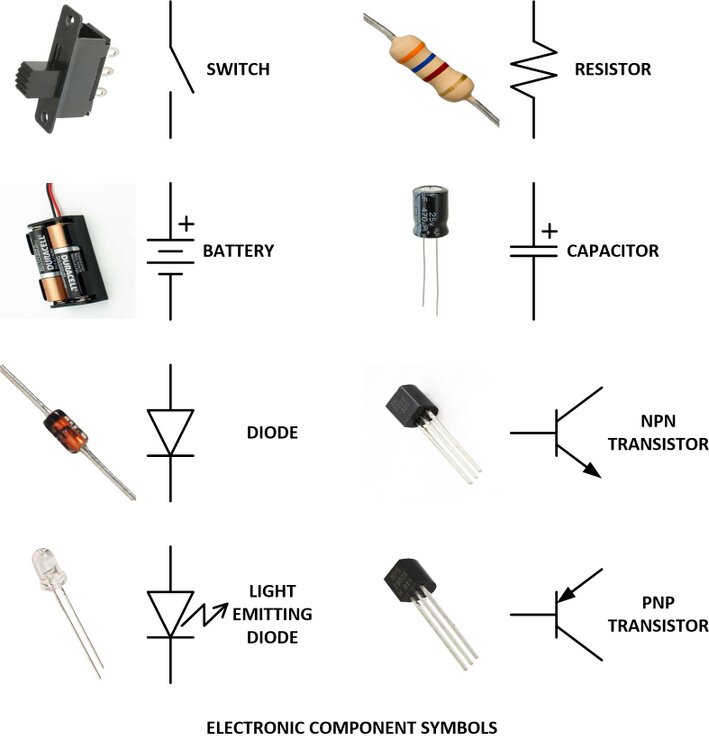
Common Components: How To Tell Them Apart At A Glance
Stop guessing. This table will help you identify the most common components in 10 seconds or less.
| Component Type | Reference Designator | Physical Appearance | Key Marking | Most Common Mistake |
|---|---|---|---|---|
| Resistor | R | Small rectangular chip (SMD) or cylindrical with color bands (through-hole) | 3-4 digit value code (e.g. 103 = 10kΩ) | Mixing up 0Ω resistors with jumpers |
| Ceramic Capacitor | C | Tiny rectangular chip, usually beige or gray | 3 digit capacitance code (e.g. 104 = 100nF) | Confusing with 0Ω resistors (same package) |
| Standard Diode | D | Black cylindrical or rectangular chip with a line on one end | Part number (e.g. 1N4007) or diode symbol | Mixing up with zener diodes |
| Zener Diode | Z | Identical to standard diodes | Part number starting with BZX or 1N5xxx | Using as a standard rectifier diode |
| Transistor | Q | 3-pin SOT-23 package or larger TO-220 package | Part number (e.g. 2N2222) | Reversing the emitter and collector pins |
| Integrated Circuit | U | Black rectangular chip with 8+ pins | Full part number and batch code | Rotating 180 degrees (pin 1 error) |
| Connector | J | Plastic housing with metal pins on the edge of the board | Manufacturer part number on the housing | Using the wrong gender or pin count |
2026 Trend: AI Is Making Manual Identification Obsolete
Something game-changing is happening in factories right now.
By the end of 2026, 85% of mid-to-large PCB assembly facilities will have integrated AI-powered component identification systems into their incoming inspection and assembly lines, up from just 31% in 2024.
These systems don’t just read part numbers – they scan the physical dimensions, pin count, and even the microscopic texture of the component body to verify authenticity. We rolled out this technology in our Shenzhen factory last December, and our incoming component error rate has dropped from 11.8% to 2.9% in just four months.
The best part? These systems can spot counterfeit and refurbished components that even experienced technicians would miss. The days of getting burned by fake ICs from Alibaba are finally coming to an end.
The #1 Mistake Even Experienced Engineers Make
They trust the BOM.
I’ve seen senior engineers with 15 years of experience send a BOM to the factory and assume it’s perfect. They never check the actual components against the design. BOMs have typos. Part numbers get outdated. Suppliers send the wrong parts.
Last year, a client sent us a BOM for a industrial control board. Everything looked correct on paper. But when we received the components, we noticed that the MOSFETs had a different part number than what was listed. The supplier had substituted a cheaper, lower voltage part without telling anyone. We caught it before production, saving them $32,000 in rework.
Always verify the first 5 boards yourself. Don’t trust anyone else to do it for you.
Real Questions, Real Answers
Q: The silkscreen is worn off or scratched. Can I still identify the component?
A: Yes, but it takes a little detective work. First, measure the physical package size and pin count – that will narrow it down to a handful of possible parts. Then, use a multimeter to test basic functionality: the diode test will tell you if it’s a diode or transistor, and resistance measurement will identify resistors. For ICs, you can sometimes read the part number under a high-powered microscope, or trace the circuit to figure out what it does. If all else fails, send us a clear photo and we’ll help you identify it for free.
Q: How do I spot counterfeit or refurbished components?
A: Look for these red flags: faded or uneven markings, mismatched package colors, rough or bent pins, and part numbers that don’t match the manufacturer’s datasheet. Refurbished components often have sanded or re-printed markings that look slightly blurry under magnification. And here’s a non-negotiable rule: if a component’s price is 50% lower than the authorized distributor price, it’s almost certainly counterfeit. There are no miracles in component sourcing.
If you’re struggling to identify a mystery component on your board, or you want to make sure your BOM and design are free of costly errors before production, we’re here to help. Send us your Gerber files, BOM, and clear photos of any questionable components, and we’ll get back to you with a detailed assessment and a transparent assembly quote within 24 hours.
Drop us an email at wm-sales-01@jkr-pcba.com or fill out the form on our website. We’ll get back to you right away.
About US
Founded in 2012, JKRGLO strives to build a one-stop platform for the electronic industry chain. By integrating PCB manufacturing, component procurement and PCB assembly services, we enable digital PCBA processing. With increasing investment in innovation and digital systems, we have achieved rapid growth and emerged as a leading PCB and PCBA manufacturer in the industry, capable of rapidly producing high-reliability and cost-effective products.