
Potentiometer Wiring: Complete Guide with Diagrams, PCB Layout Tips & Troubleshooting
서론
Quick Answer:Potentiometer wiring connects a three-terminal variable resistor into a circuit to adjust voltage, current, or signal level. The standard voltage divider configuration ties one end terminal to Vcc, the other to GND, and uses the wiper as the adjustable output. Common wiring mistakes include floating ground terminals, reversed supply polarity, and cold solder joints on PCB-mounted pots. For most PCB applications, linear taper pots work for general voltage/current control, while logarithmic taper pots are standard for audio volume circuits.
How Potentiometer Wiring Works
The total resistance between the two end terminals stays constant. As you turn the shaft or slide the knob, the resistance between wiper and each end terminal changes in opposite proportions. This is what makes it work for adjustable output — you’re not changing the total resistance, just where the tap point sits.
This is the key difference between a potentiometer (three terminals, voltage control) and a rheostat (two terminals, current control). A lot of wiring confusion starts with mixing these two up.
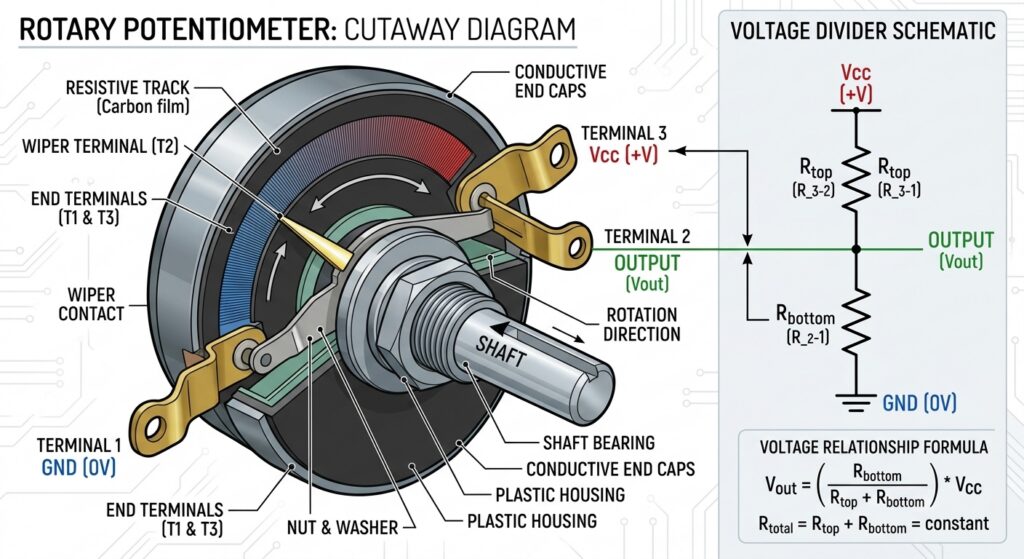
Standard Potentiometer Wiring Configurations
There are two primary wiring schemes you’ll use 99% of the time. Picking the right one for your application is the first step to clean, reliable performance.
1. Voltage Divider Mode (3-Terminal Wiring)
This is the standard, most common potentiometer wiring setup — and the one you should use for nearly all voltage adjustment, sensor calibration, and signal level control.
Wiring steps:
- Connect Terminal 1 (one end of the resistive track) to your positive supply voltage (Vcc).
- Connect Terminal 3 (the opposite end of the track) to circuit ground (GND).
- Connect Terminal 2 (the wiper) to the input of the circuit you want to adjust.
As you turn the pot, the wiper moves up and down the track, and the output voltage on the wiper sweeps smoothly from 0V (full GND position) up to full Vcc (full supply position).
다음에 가장 적합합니다: Voltage adjustment, sensor calibration, LED dimming, signal level control, reference voltage tuning.
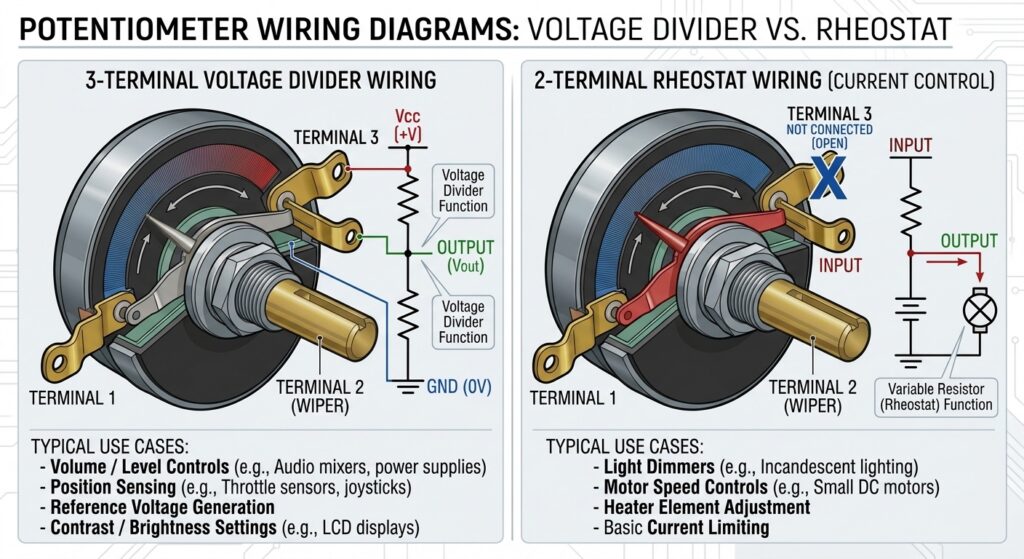
2. Rheostat Mode (2-Terminal Wiring)
In this configuration, you only use two terminals: one end terminal and the wiper. The third end terminal is either left unconnected or tied directly to the wiper.
Instead of adjusting voltage, you’re varying the total resistance in series with the load, which controls current flow.
Wiring steps:
- Connect Terminal 1 to the positive side of your circuit or load.
- Connect Terminal 2 (wiper) to the return path.
- Leave Terminal 3 unconnected, or jumper it directly to Terminal 2 for improved reliability.
다음에 가장 적합합니다: Current control, motor speed adjustment, brightness control for high-current LEDs.
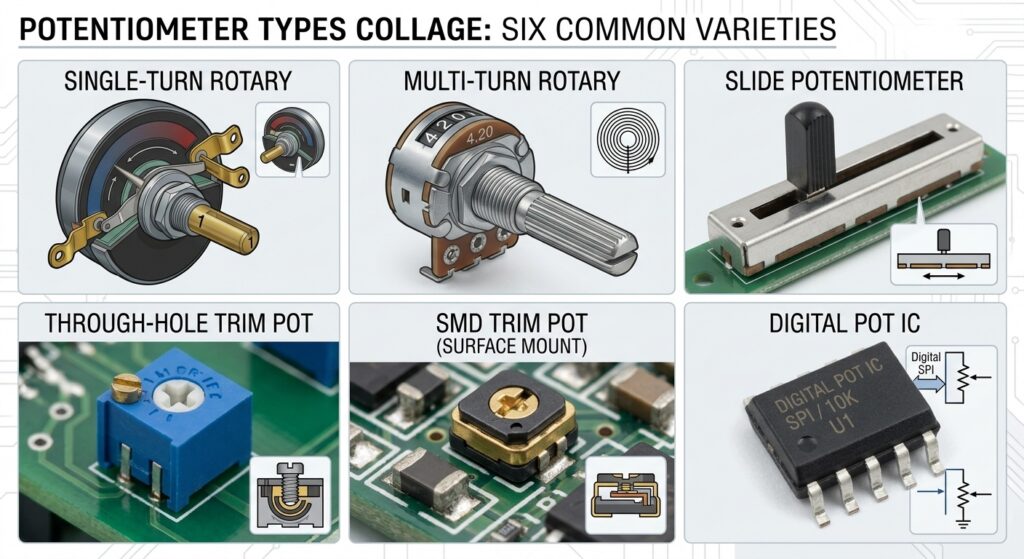
Potentiometer Types & Wiring Considerations
Not all pots are wired the same way. The physical type and taper change how you connect them, and how they’ll behave on your PCB.
Linear Taper Pots
Resistance changes evenly and linearly with wiper position. Halfway through the rotation = half the total resistance.
- Wiring notes: No special considerations; works predictably in both voltage divider and rheostat mode.
- Typical PCB uses: Sensor calibration, voltage reference adjustment, motor speed control, general purpose tuning.
Logarithmic (Audio) Taper Pots
Resistance changes on a logarithmic curve, matched to how the human ear perceives loudness. Most of the resistance change happens in the first portion of rotation.
- Wiring notes: Always confirm which terminal is the “low” end before wiring. Reversing the terminals on a log pot gives you a backwards, unnatural response.
- Typical PCB uses: Audio volume controls, tone adjustment, audio amplifier circuits.
Rotary Pots
The classic knob-operated pot, available in single-turn and multi-turn variants.
- Wiring notes: Panel-mount rotary pots often have longer leads that can pick up noise; use shielded wire for low-level analog signals.
- Multi-turn versions: Offer far finer adjustment; standard for precision calibration on instrumentation PCBs.
Slide Pots
Wiper moves along a straight track via a sliding knob.
- Wiring notes: Physically longer track means more opportunity for contamination; add a small capacitor on the wiper output to smooth out scratchy behavior.
- Typical uses: Audio faders, graphic equalizers, front panel controls.
Trimmer Potentiometers (Trim Pots)
Small, PCB-mounted pots designed for “set it and forget it” calibration during manufacturing or service. Adjusted with a screwdriver.
- Wiring notes: SMD trim pots are sensitive to soldering heat; avoid prolonged heating on the pads that can damage the internal resistive element.
- Typical PCB uses: Factory calibration of sensor circuits, offset adjustment, reference voltage trimming.
Digital Potentiometers (Digipots)
No mechanical wiper — resistance is set digitally via I2C or SPI interface.
- Wiring notes: Treat the resistor terminals like a standard pot, but add proper digital signal decoupling and pull-up resistors on the communication bus.
- Typical PCB uses: Remote calibration, automated tuning, microcontroller-controlled circuits.
How to Choose the Right Potentiometer for Your PCB Design
Picking the right pot for the job prevents most wiring and performance problems before they happen. These are the criteria we prioritize for PCB assemblies:
- Resistance Value Match the nominal resistance to your circuit impedance. As a rule of thumb, the pot’s total resistance should be roughly 10x the load impedance for voltage divider mode to avoid loading effects. Common values for PCB work are 1kΩ, 10kΩ, and 100kΩ.
- Taper Type Linear for voltage/current control and calibration; logarithmic exclusively for audio volume. This is the single most commonly misselected spec.
- Power Rating Make sure the pot can safely dissipate the maximum power in your circuit. For most signal‑level PCB applications, 0.125W to 0.5W is more than enough. Derate by 50% for long‑term reliability.
- Mounting Style Through‑hole for rugged panel mount; SMD trim pots for compact, automated PCB assembly. Always verify footprint dimensions against your datasheet before fabrication — a quick DFM check avoids prototype re‑spins.
- Environmental Rating For industrial or outdoor PCBs, specify sealed pots with appropriate IP ratings. For high‑vibration environments, choose units with locking shafts or wiper detents.
Troubleshooting Common Potentiometer Wiring Problems
These are the four most common issues we see during PCB prototype testing and assembly QC, along with the fixes that actually work.
1. Erratic, Jittery, or Scratchy Output
Causes: Dirty or worn wiper contacts, cold solder joints on the wiper pad, flux residue on the resistive element, or loose wiring. On PCB-mounted trim pots, bad solder joints are the number one culprit. Fix:
- Re-solder all three terminals to rule out cold joints.
- For mechanical pots, rotate the shaft fully from end to end 10–15 times quickly to “wipe” clean the internal track.
- Add a 10nF to 100nF ceramic capacitor from wiper to GND, right at the pot’s footprint, to smooth out noise.
2. No Output, or Output Stuck at Full Supply / Zero
Causes: Open circuit in the resistive track, reversed supply connections, wiper terminal completely disconnected, or an internal dead spot on the track. Fix:
- Verify Vcc and GND are on the correct end terminals.
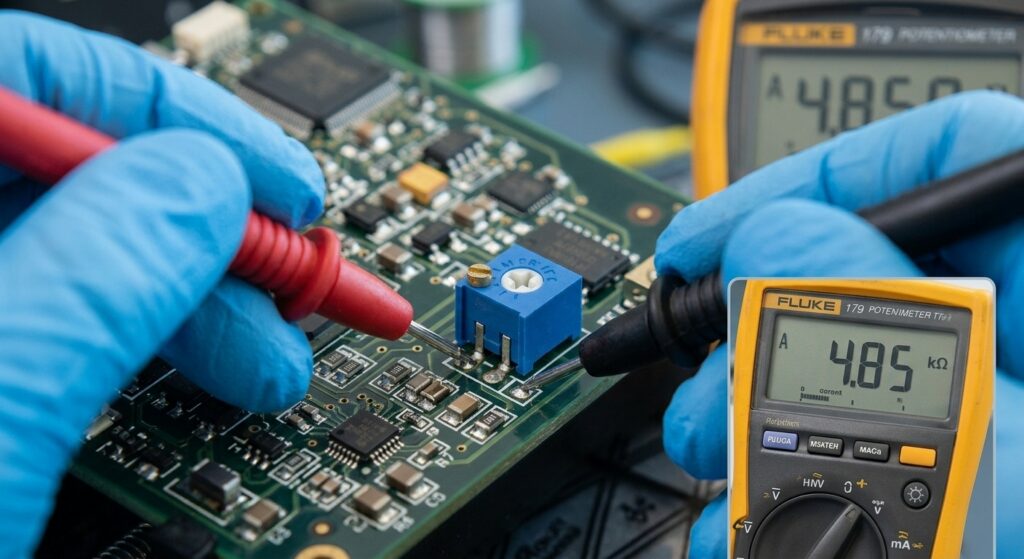
- Test with a multimeter in resistance mode across the two end terminals — you should see the full rated resistance. If it reads open, the pot is damaged.
- Check wiper continuity as you rotate the shaft.
3. Output Doesn’t Cover Full Range
Causes: Loading effect from the following circuit, or incorrect wiring of the wiper terminal. Fix:
- If the load impedance is too low, the wiper voltage will never reach full Vcc. Add an op-amp voltage follower (unity gain buffer) between the wiper and the load for impedance matching.
- Confirm the wiper isn’t tied to supply or ground by accident.
4. Crackling or Intermittent Audio (Log Taper Pots)
Causes: Bad grounding, shield not connected properly, or worn wiper contacts. Fix:
- Use shielded cable for panel-mount audio pots. Connect the shield to ground at only one end (the circuit board end) to avoid ground loops.
- Clean the pot contacts with contact cleaner.
Advanced PCB Wiring & Layout Tips
These are the tricks that separate reliable production designs from finicky prototypes. Most generic wiring guides never mention PCB-specific details.
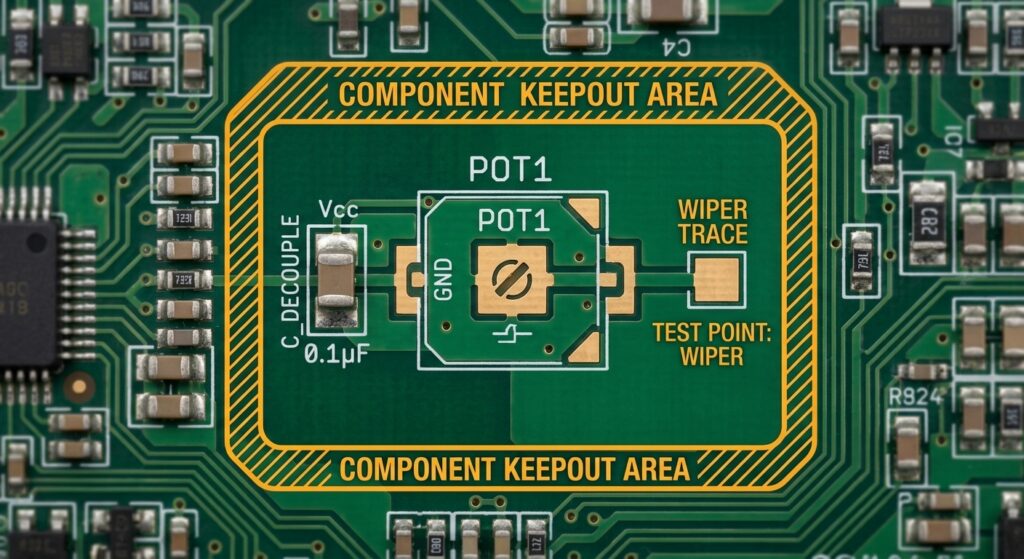
- Decouple right at the footprint Place a 100nF ceramic capacitor directly across the Vcc and GND terminals of the pot, as close to the pads as possible. This suppresses power line noise before it gets into the resistive track.
- Route wiper traces away from noise sources On the PCB layout, keep the wiper signal trace away from high‑speed digital lines, switching regulators, and power paths. Crosstalk on a high‑impedance wiper line is a very common source of hidden noise.
- Add a test point on the wiper For trim pots on production boards, add a dedicated test point on the wiper net. This makes QC testing and field calibration much faster and more reliable.
- Use the right pad size for SMD trimmers Oversized pads can cause solder wicking up the side of the pot, which can seep inside and ruin the resistive element. Follow the datasheet recommended footprint exactly.
- Shielded wiring for panel mounts If you’re wiring a panel‑mount pot to a PCB inside an enclosure, use shielded twisted pair for low‑level analog signals. Ground the shield only at the PCB end.
Conclusion
Potentiometer wiring might look trivial on a schematic, but the details — terminal order, taper type, PCB layout, and solder quality — make all the difference between a circuit that works reliably for years and one that drifts, crackles, or fails out in the field.
Start by picking the right configuration: 3-terminal voltage divider for voltage adjustment and calibration, 2-terminal rheostat for current control. Match the taper to your application, and always take the extra minute to add a small decoupling cap and verify your solder joints. For PCB-mounted trim pots, good footprint design and proper soldering prevent the majority of field failures.
Whether you’re laying out a calibration circuit on a prototype or designing front panel controls for a production assembly, solid potentiometer wiring practices are foundational to reliable electronics.
회사 소개
다음 내용도 참고해 보세요…

저자 소개
앤드류 잔 – JKRGLO.com 연구개발(R&D) 엔지니어
앤드류 잔(Andrew Zhan)은 PCB 업계에서 14년 이상의 연구개발(R&D) 엔지니어링 경력을 쌓아왔으며, 회로 설계 최적화 및 DFM 구현 분야에서 깊은 전문성을 보유하고 있습니다. 그는 복잡한 설계 요구 사항을 양산 가능한 솔루션으로 전환하는 데 주력하며, 시제품 제작과 양산 모두에서 기술 혁신을 주도하고 있습니다.
그는 여러 부서의 팀 및 고객과 긴밀히 협력하며, 프로젝트의 전체 수명 주기 동안 철저한 품질 검증과 원활한 기술적 소통을 보장합니다. 앤드류는 고객의 기대를 꾸준히 뛰어넘는, 신뢰할 수 있고 고성능의 PCB 솔루션을 제공하는 데 전념하고 있습니다.
목차
그래도 도움이 필요하신가요? 문의하기:
PCB 또는 PCBA 견적이 필요하신가요?
태그:
PCB design
PCBA
Hardware Engineer
component wiring
resistor
Potentiometer
troubleshooting