
PCB Design Basics: The Rules That Decide Whether Your Board Works
Reviewed against IPC-2221C (2023) and IPC-2152 (2009) practice
Most PCB design guides open with a tour of the software menu and close with a list of habits: keep traces short, avoid right angles, pour a ground plane. None of that is wrong. It is just not where boards fail.
Boards fail in three places. A net connected to the wrong pin. A trace sized for the average current instead of the peak. A return current with nowhere to go. All three are decided long before the layout looks finished, and all three are invisible in a 3D render.
So this guide is built around the decisions that survive contact with a fabricator — the copper you cannot etch thinner, the spacing you cannot shrink, the stackup that fixes your impedance before you route a single trace. If you are new to the board itself, start with the parts that make up a circuit board and come back; if you already know what a via is, skip to the trace width section and read the arithmetic.
簡単な回答
- PCB design is the process of converting a circuit netlist into three artifacts: a schematic that defines connectivity, a layout that defines copper geometry, and a fabrication package that tells the board house how to build it.
- A PCB design rule is a constraint on copper geometry — trace width, spacing, annular ring, drill size or via aspect ratio — derived from current, voltage, impedance or a fabricator’s process limit.
- The 3W rule states that two parallel traces should be at least three times the trace width apart, measured centre to centre; at that distance roughly 70% of the electric-field crosstalk between them is removed, and at 10W roughly 98%.
- Clearance is the shortest distance through air between two conductors; creepage is the shortest distance along the surface of the insulation between them.
- Design for manufacturability (DFM) is the review that compares a finished layout against one specific fabricator’s process capability before the Gerbers are released.
The short version: width and spacing are calculated from current, voltage and impedance — not copied from a checklist. Everything else in this guide follows from that.
What PCB Design Actually Produces
A finished design is five files that leave your desk and go to four different people. Treating them as one thing is why so much rework happens at the handoff instead of in the editor.
A PCB layout is the physical realization of a schematic: it assigns every net to a copper layer, every component to a position, and every connection to a trace width that can carry its current.
| Artifact | What it defines | Who reads it | What breaks if it is wrong |
|---|---|---|---|
| Schematic (netlist) | Which pin connects to which | You, ERC, the test engineer | A net on the wrong pin; silent rework after assembly |
| Layout (Gerber) | Copper geometry, layer by layer | The fab house | Opens, shorts, impedance that misses its target |
| Drill and rout | Hole positions, sizes, board outline | The drill and routing stations | Holes off the pad; a board that will not fit the enclosure |
| BOM | Part numbers, values, quantities | Procurement and the SMT line | Wrong part, wrong package, missing DNP flag |
| Pick-and-place (CPL) | X/Y position and rotation of every part | The placement machine | Rotated or offset parts, tombstoning, a line stop |
The first two are electrical. The last three are mechanical and logistical, and they are where most first-article surprises come from. A board can pass every simulation you own and still be unbuildable because the drill file used a different origin than the Gerbers.
Where the handoff usually breaks
- Gerber layers exported with the wrong polarity — inner layers come out negative and the fab has to call you.
- A BOM that lists a 10µF 0603 cap while the layout used an 0805 footprint, because the schematic symbol was generic.
- No stackup drawing. The fab builds a symmetrical 4-layer board with 0.2 mm prepreg, your 50 Ω traces land at 58 Ω, and nobody finds out until the impedance coupon is measured.
If you want to see how those files turn into physical copper, how a PCB is fabricated, step by step walks the whole fabrication sequence; the rules in this article are the ones that sequence enforces on you.
The Design Workflow, Stage by Stage
There is no single correct order, but there is a wrong one: routing first and discovering the constraints afterwards. The sequence below keeps the expensive decisions early, where changing them is still free.
| Stage | Output | What it prevents |
|---|---|---|
| 1. Requirements and constraints | Voltage and current envelope, thermal budget, enclosure size, EMC class | A board that works on the bench and fails certification |
| 2. Schematic capture | Netlist with a clean ERC | Wrong connections that cost a full respin |
| 3. Footprint verification | Library parts checked against datasheets | Pads that do not match the reel |
| 4. Stackup and design rules | Layer assignment, dielectric heights, impedance targets | A 50 Ω trace that is not 50 Ω |
| 5. Placement | Floorplan, keepouts, connector positions | Routing that cannot be closed without a jumper |
| 6. Routing | Copper on every layer | Crosstalk, opens, unnecessary vias |
| 7. DRC and DFM | Reports against the fab’s capability | A design bounced at the CAM stage |
| 8. Release | Gerber, drill, BOM, CPL, assembly drawing | A build that differs from what you simulated |
Two stages deserve more time than they usually get. Stage 4, because the stackup sets impedance and EMI before a trace exists. Stage 7, because a DFM review costs an afternoon and a respin costs four weeks.
The step almost everyone skips
Stackup selection is treated as a purchasing decision — pick 4 layers because 4 layers is standard. In practice the stackup is an electrical decision. It fixes the dielectric height under each signal layer, and that height, not the trace width, is what sets a microstrip’s impedance. Once the board is laminated you cannot change it.
The Four Inputs You Cannot Start Without
Every project that started late started because one of these four was missing and nobody noticed until routing.
| Input | Where it comes from | What happens without it |
|---|---|---|
| Stackup | The fabricator, in writing | Impedance targets are guesses; layer count changes at the last minute |
| Component library | Datasheets plus supplier land patterns | Footprints that look right and are 0.1 mm wrong |
| Mechanical drawing | The enclosure or the customer | Connectors that do not line up with the cutouts |
| Electrical constraints | Your own SI/PI budget | Rules set by habit rather than by current and edge rate |
A footprint is a copper pattern matched to one specific package drawing — not to a part number. The same part number can ship in two packages, and the same package name can have two different pad geometries.
The most expensive mistake in this list is a wrong footprint. It passes DRC, it passes ERC, it looks correct in 3D, and it only shows up when the reel arrives. Verify the land pattern against the datasheet drawing, not against the symbol name in your library.
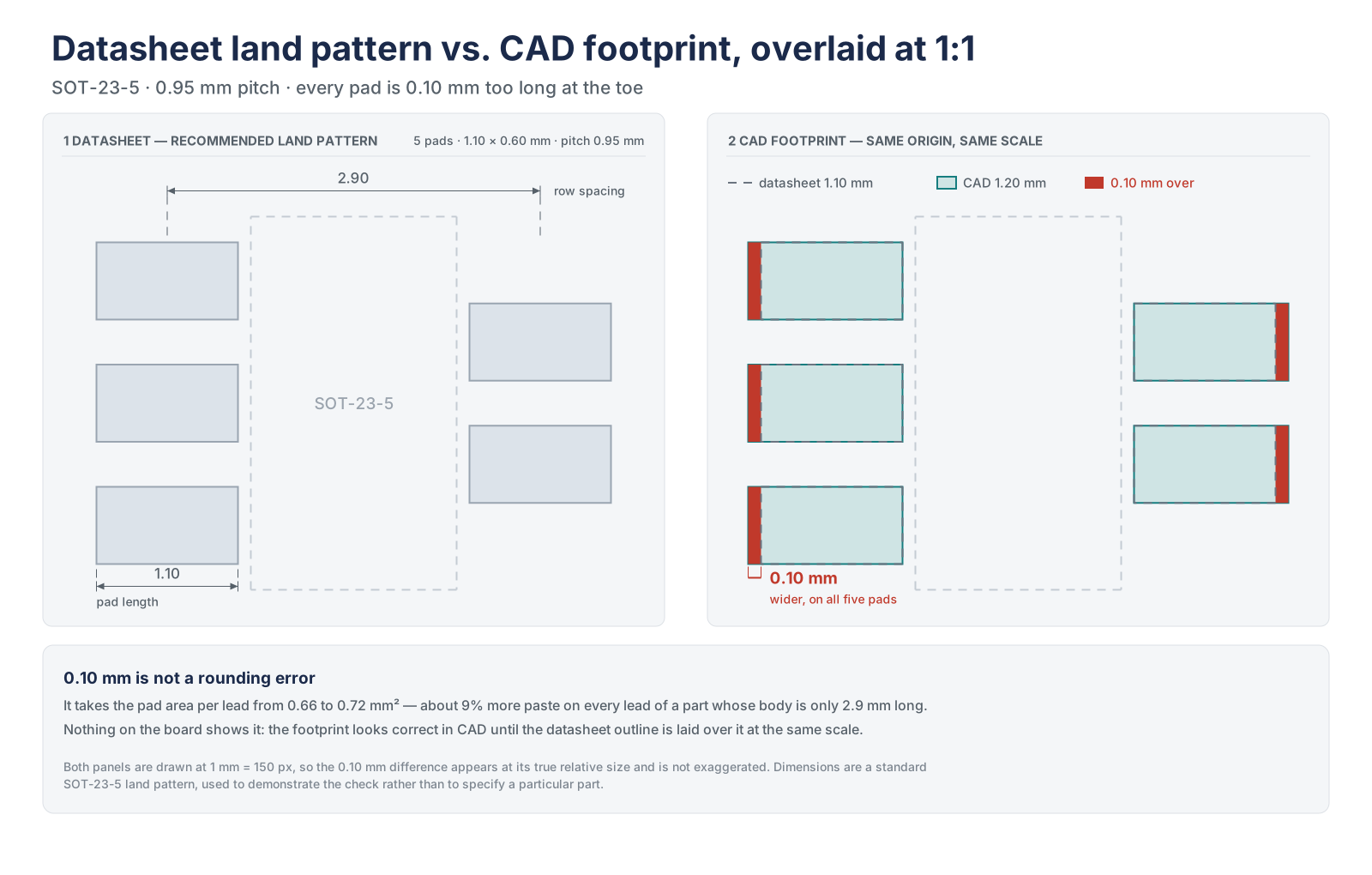
Two habits make this cheap. First, keep a house library where every part has a datasheet link and a revision date, so a footprint is either verified or visibly unverified. Second, on any board with more than about 200 parts, add a 1:1 paper print of the land patterns for the fine-pitch devices and lay the actual parts on it. It takes ten minutes and catches pad geometry errors that no DRC will flag.
Schematic Rules That Prevent Layout Rework
A schematic is not a drawing of the circuit. It is a netlist with pictures attached, and the pictures matter only because humans read them at 11 pm.
| Rule | Why it exists | Typical failure when ignored |
|---|---|---|
| Name nets by function, never leave NetC1_1 | The layout engineer routes what they can read | A clock net treated as a slow GPIO |
| Run ERC with zero errors before layout | Catches unconnected pins and conflicting outputs | Two drivers on one net |
| Put a power flag on every supply rail | ERC cannot infer where power comes from | Dozens of false ‘not driven’ warnings that hide the real one |
| Draw decoupling next to the pin it serves | Placement follows the drawing | A 0.1 µF cap 15 mm from the die |
| Assign net classes for power, clocks and high speed | Classes become layout rules automatically | Every net inherits the default 6 mil width |
| Use no-connect flags on unused pins | Floating pins are invisible to ERC | An unused enable pin that floats into oscillation |
| Keep analog and digital returns separate until one join point | Defines where the two domains meet | A return current crossing the whole board |
Electrical rule check (ERC) verifies that a schematic is internally consistent: no outputs shorted together, no inputs left floating, no power net without a source. It says nothing about whether the circuit is correct.
That distinction matters. A clean ERC means the netlist does not contradict itself. A design that passes ERC can still drive an LED from a pin rated for 4 mA, or tie a 5 V signal into a 3.3 V input. ERC is a lint pass, not a design review.
The one schematic habit worth adopting above all others: write the intent into the net name and the note. “CLK_25M_FPGA” tells the next person three things that “NET0042” does not. When the layout is done by someone else — or by you, eight months later — that name is the only context left.
Component Placement Decides the Routing, Not the Other Way Round
Component placement is the assignment of position and orientation to every part on the board. It fixes the length, the coupling and the thermal environment of every net before a single trace is drawn.
A useful way to think about it: routing is the consequence of placement, and rework is the consequence of routing badly. If a board takes three days to route, the placement was wrong on day one.
The order that works
- Connectors and mechanical parts first — they are fixed by the enclosure and cannot move later.
- Power conversion next: input protection, regulator, inductor, output capacitors, in the order current flows.
- Clocks and references: crystal or oscillator, then the load capacitors, kept short and away from switching nodes.
- High-speed devices and their termination, grouped by interface rather than by schematic page.
- Analog and sensitive front ends, placed so their return currents stay inside their own area.
- Everything else, then test points and programming headers last.
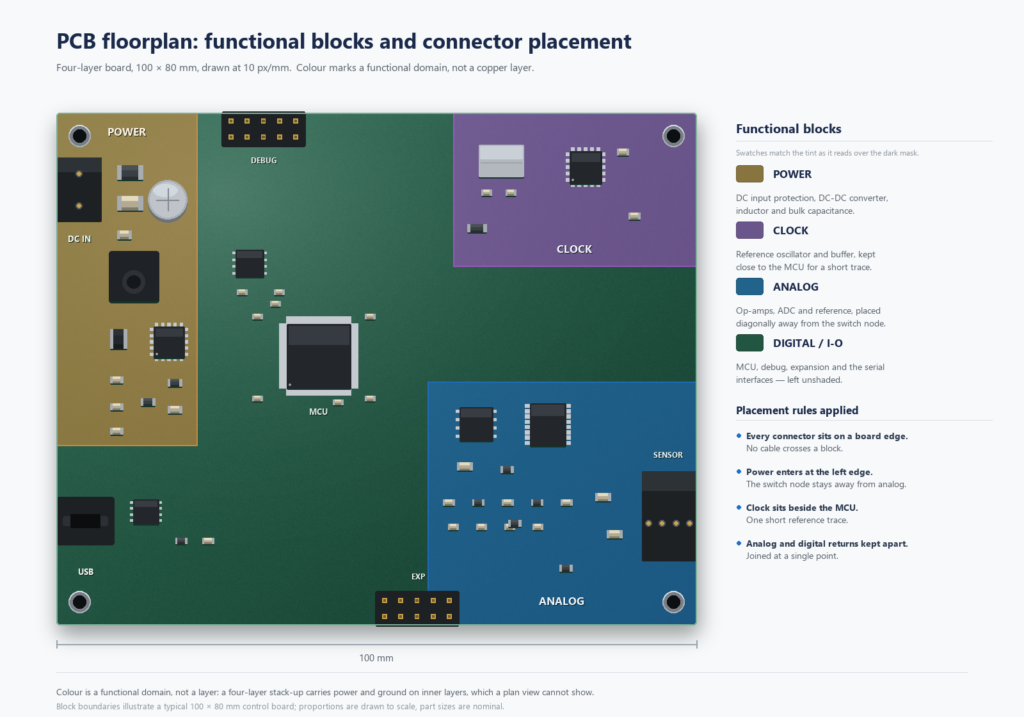
| Placement decision | Rule of thumb | Cost of ignoring it |
|---|---|---|
| Connector position | At the board edge, silkscreen facing outward | A cable that cannot be inserted with the lid on |
| Decoupling capacitors | Same side as the pin, within 2–3 mm | Supply droop on every switching edge |
| Crystal | Within 5 mm of the pins, no trace underneath | Frequency drift that only appears warm |
| Switching regulator | Keep the hot loop under 10 mm² | Radiated emissions you cannot filter out later |
| Analog vs digital | Separate areas, single join point | Noise floor 20 dB worse than expected |
| Thermal | Heat sources at the edge, vias under pads | A board that derates itself in a sealed box |
One more constraint that never appears in a design guide: assembly. If a part is taller than 3 mm and sits next to a fine-pitch connector, the placement machine may not be able to reach it, and the reflow profile may not be uniform across the board. surface mount technology explains why the assembly sequence quietly rules out some placements.
Trace Width: The Arithmetic Nobody Shows You
Trace width is the copper dimension that sets a trace’s cross-sectional area, and therefore its resistance and temperature rise. It is calculated from current, copper weight and an acceptable temperature rise — not chosen by eye.
Three variables decide the number: how much current the trace carries, how thick the copper is, and how much temperature rise you are willing to accept. A fourth — impedance — overrides all of them once the signal edge gets fast.
The IPC-2221 relationship
The classic chart in IPC-2221 is a curve fit of this equation, where I is current in amps, ΔT is temperature rise in °C, and A is the trace cross-section in mils²:
I = k · ΔT0.44 · A0.725 k = 0.048 external, 0.024 internal
The constant is the interesting part. Internal layers get half the current capacity of external ones for the same copper, because the laminate on both sides traps the heat. That single factor explains why a power plane on an inner layer needs roughly twice the width of the same net on the top layer.
| Current | External width (1 oz, 10 °C rise) | Internal width (1 oz, 10 °C rise) |
|---|---|---|
| 0.5 A | 0.13 mm (5 mil) | 0.25 mm (10 mil) |
| 1 A | 0.25 mm (10 mil) | 0.51 mm (20 mil) |
| 2 A | 0.64 mm (25 mil) | 1.27 mm (50 mil) |
| 3 A | 1.27 mm (50 mil) | 2.54 mm (100 mil) |
| 5 A | 2.79 mm (110 mil) | 5.59 mm (220 mil) |
| 10 A | 10.2 mm (400 mil) | 20.3 mm (800 mil) |
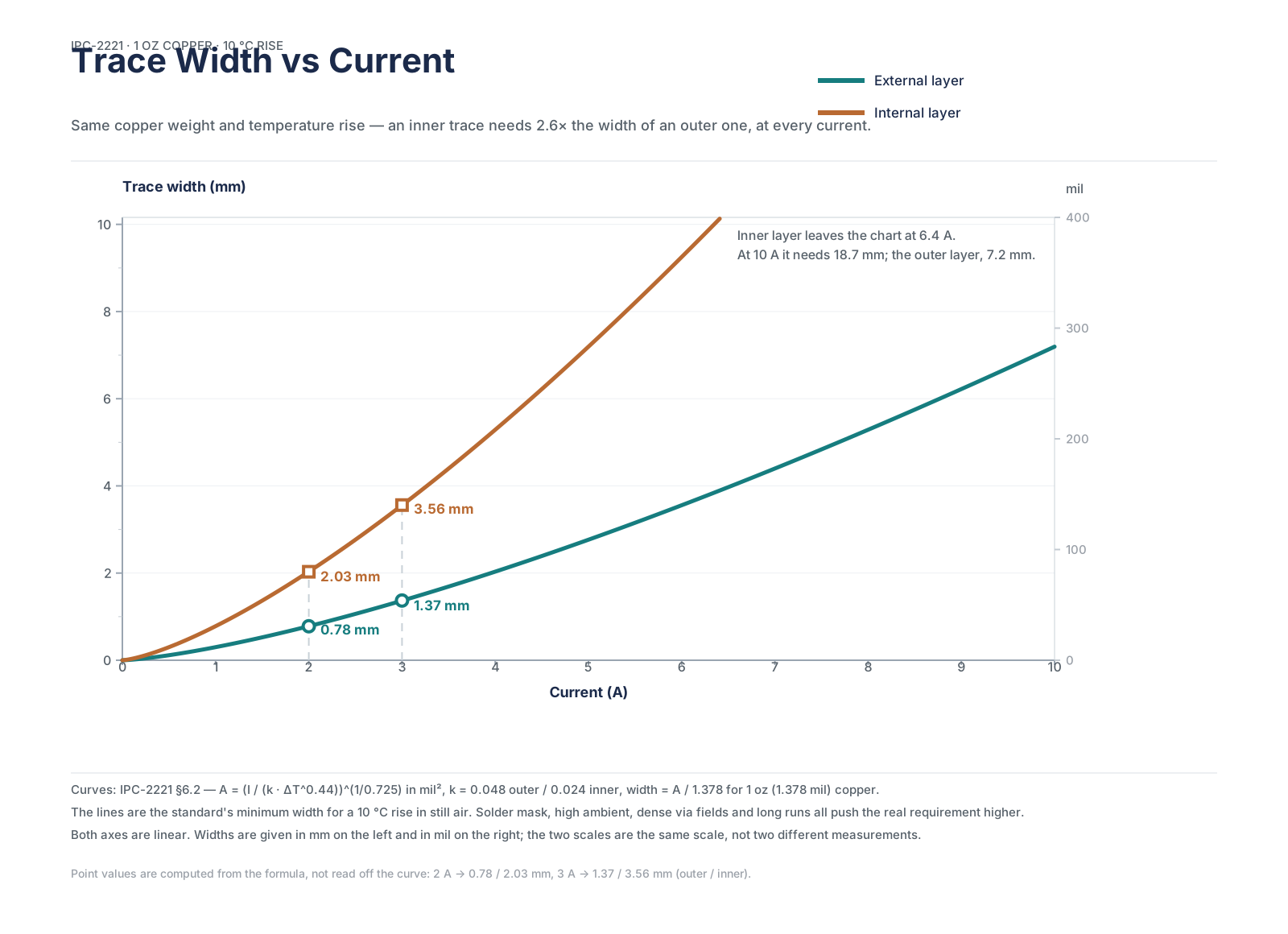
Read that table with the copper weight in mind. These numbers assume 1 oz (35 µm) finished copper. Doubling to 2 oz roughly halves the width you need, which is often cheaper than spending board area on wide traces — but 2 oz copper also raises the minimum etchable width, so it is not free.
Why IPC-2152 gives a different answer
IPC-2152, published in 2009, revisited the current-carrying problem with better thermal modelling, including the effect of adjacent copper and the board itself acting as a heatsink. In practice it typically allows traces 1.5–2× narrower than the legacy IPC-2221 curve for the same temperature rise.
This is a genuine disagreement between two standards, not a rounding error. If you are sizing a 3 A rail, the difference between 1.27 mm and 0.8 mm is real estate. The safe habit: size with IPC-2221, then check whether your fabricator’s current calculator — which usually implements IPC-2152 — would let you go narrower. Do not go the other way round.
The margin nobody budgets
Calculated widths are minimums at nominal copper thickness. Plating thickness varies across a panel, etch undercut removes copper at the trace edges, and a trace that runs at exactly 10 °C rise in simulation may see 25 °C in a sealed enclosure at 60 °C ambient. Add 20–50% on power paths and treat the result as the starting width, not the target.
A trace is a resistor, and a resistor is a fuse if you get it wrong. A 0.25 mm trace carrying 3 A on an inner layer will not fail in the lab. It will fail after two months in the field, at the point where the laminate has been cooked long enough to delaminate.
Spacing and Clearance: Three Numbers People Keep Confusing
“Spacing” is used for at least three different constraints in a layout review, and they are not interchangeable. Mixing them up produces boards that are either needlessly large or quietly unsafe.
| What you are protecting against | Governed by | Typical value |
|---|---|---|
| Etching — the fab cannot resolve two features closer than this | Process capability, rises with copper weight | 0.10–0.15 mm (4–6 mil) |
| Arcing between nets at different voltages | IPC-2221 voltage clearance, IEC 62368 for mains | 0.1 mm at low voltage, millimetres at mains |
| Crosstalk between two signal traces | Geometry and stackup, not a safety standard | 3× trace width (the 3W rule) |
| Tracking across a contaminated surface | Creepage, from the safety standard | Always ≥ clearance |
Coated and uncoated are different rows
Solder mask is a coating, and IPC-2221 gives a smaller minimum spacing for a coated conductor than for an exposed one. Most spacing tables copied around the internet collapse the two into one column, which is why you see numbers that disagree with each other by a factor of five.
| Working voltage (DC or AC peak) | Internal conductors | External, solder-mask coated | External, uncoated |
|---|---|---|---|
| ≤ 30 V | 0.10 mm | 0.10–0.13 mm | 0.10–0.13 mm |
| 31–100 V | 0.10 mm | 0.13 mm | 0.60 mm |
| 101–150 V | 0.20 mm | 0.20 mm | 0.60 mm |
| 151–300 V | 0.20 mm | 0.20 mm | 1.25 mm |
| 301–500 V | 0.25 mm | 0.25 mm | 2.50 mm |
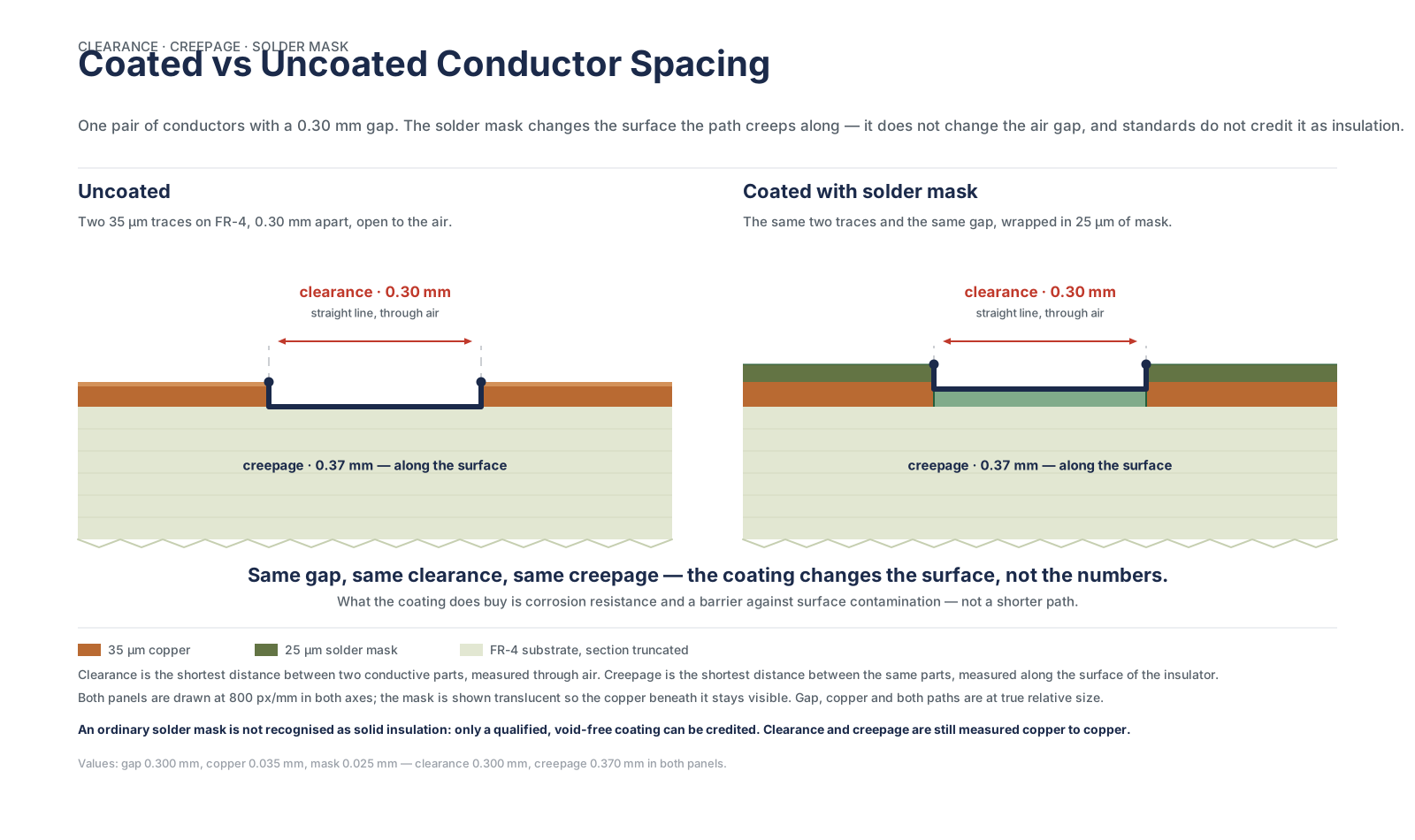
Those are the widely published values from IPC-2221 Table 6-1. The standard itself is the authority, and any safety-critical product should be checked against the current revision plus the relevant product standard — but the pattern is what matters: the uncoated column jumps by roughly 5× once you leave the low-voltage band, because air breaks down and contaminated surfaces track.
A coated conductor is one covered by solder mask or conformal coating over its full length. The moment a pad, a test point or a connector pin is exposed inside the gap, that gap is uncoated — and the larger number applies.
Clearance vs creepage
Clearance is the straight line through air. Creepage is the path along the surface, and it is always longer because surfaces get dirty and humidity makes them conductive. For a 3.3 V logic board the distinction never comes up. For anything that touches mains, or a patient, it decides the layout.
If your product has a mains input, a medical applied part, or a 250 V DC bus, stop treating spacing as a layout preference. Get the applicable standard — IEC 62368-1 for IT equipment, IEC 60601-1 for medical — and derive the numbers from the working voltage, pollution degree and insulation type. PCB fabrication can build to those gaps, but only if the drawing specifies them.
Stackup: What Actually Decides 4, 6 or 8 Layers
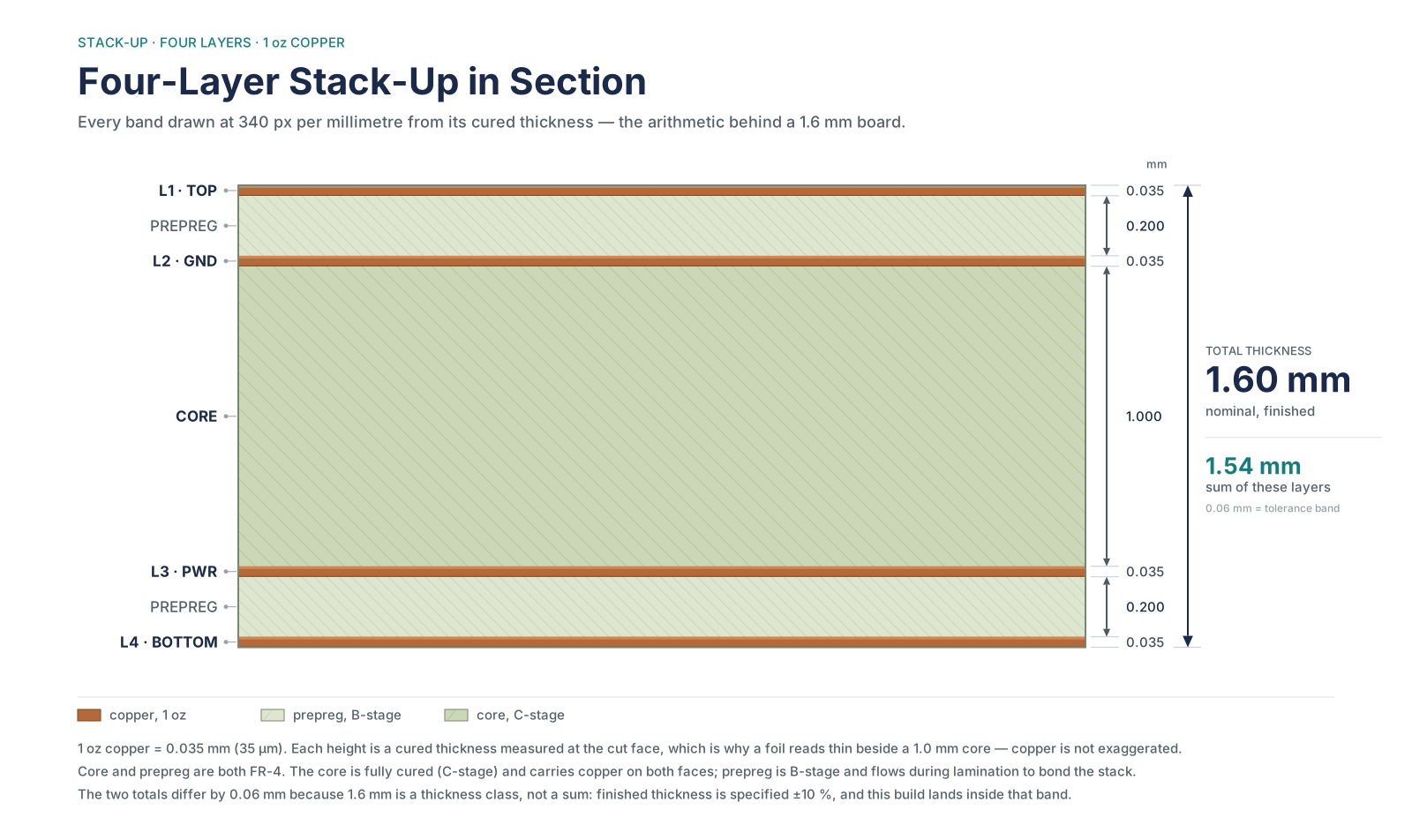
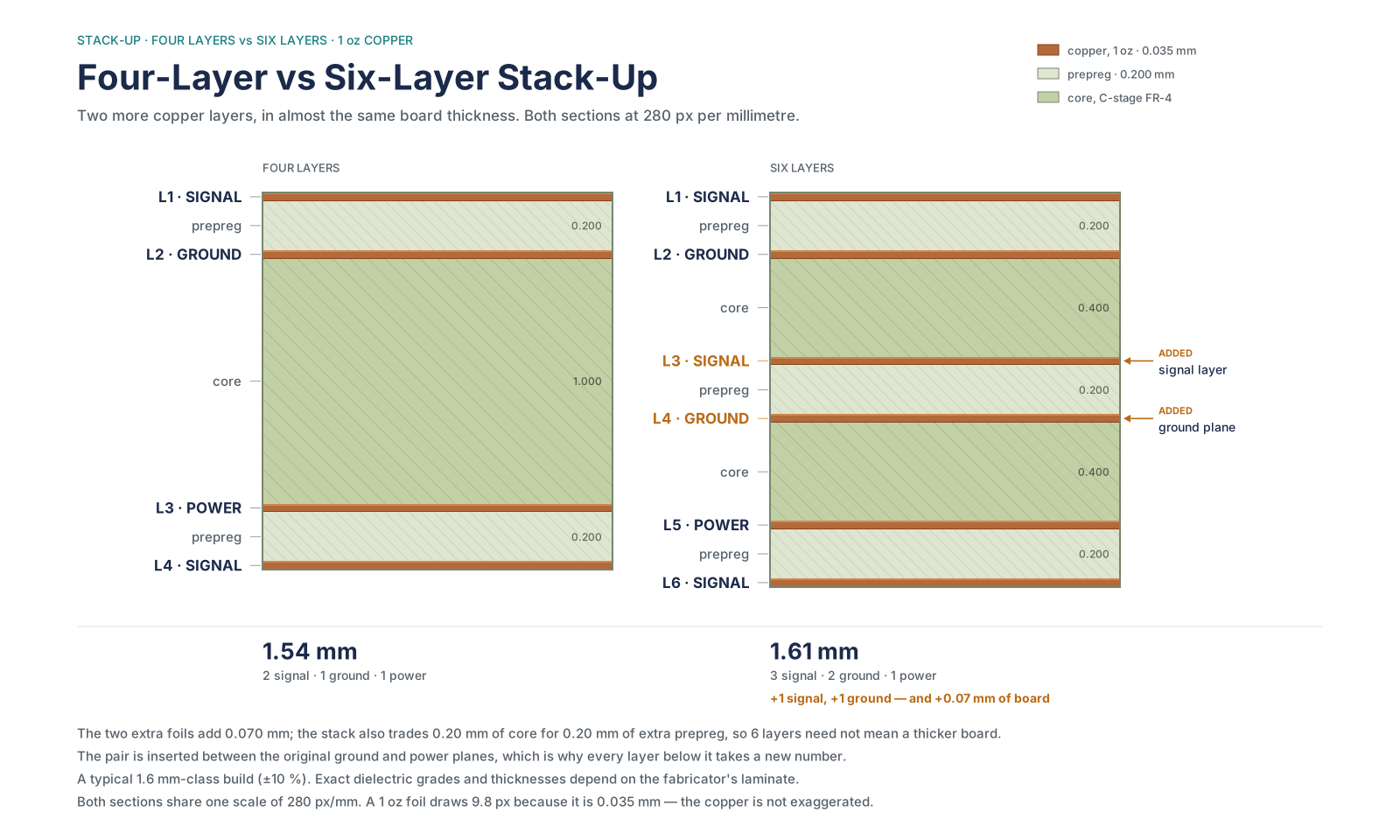
A stackup is the ordered sequence of copper and dielectric layers in a board, with a thickness for each. It fixes the impedance of every signal layer, the board’s EMI behaviour and its mechanical warp before routing begins.
The usual reason given for going to four layers is “more routing room”. The better reason is that a four-layer board lets you put a solid reference plane 0.2 mm under the signal layer, which does more for signal integrity than doubling the routing area.
| Layer count | Typical stack | When it is the right choice | What it costs |
|---|---|---|---|
| 2 | Signal / signal | Low-speed, low part count, cost-driven | No reference plane; 3H spacing rule dominates |
| 4 | Signal / ground / power / signal | The default for anything with a microcontroller and a clock | One prepreg thickness to choose carefully |
| 6 | Signal / ground / signal / power / ground / signal | DDR, USB 3, dual-rail analogue, dense BGAs | Two more layers of tooling and laminate |
| 8+ | Multiple signal and plane pairs | High-speed serial, HDI, fine-pitch BGA escape | Cost and lead time both climb |
Two rules that are not negotiable
- Symmetry. The copper distribution and dielectric thickness should mirror around the board centre. An asymmetric stackup warps during reflow, and a warped board is a placement defect, not a cosmetic one.
- Every signal layer needs an adjacent plane. If a signal layer sits between two signal layers, its return current has no defined path and will find one through the nearest via — usually across half the board.
Layer count also changes the meaning of a rule. On a 1.6 mm two-layer board the dielectric under the trace is about 1.4 mm, so crosstalk is dominated by the distance to the reference, not by the distance to the neighbouring trace. That is why the 3H rule exists and why 3W alone disappoints on cheap boards. If you are still choosing between single, double and multilayer boards, the layer-count decision usually decides which spacing rule you need.
Material choice follows the same logic. Standard FR-4 has a dielectric constant around 4.3 and a glass transition temperature of 130–140 °C; high-Tg FR-4 pushes that to 170–180 °C for lead-free reflow and thicker boards. choosing a PCB material covers the trade-off, including when a low-loss laminate is genuinely worth the price.
Grounding Is a Return Path Problem, Not a Ground Problem
“Ground” is a name, not a physical property. Every signal current that leaves a driver comes back to it, and at anything above a few hundred kilohertz it comes back through the path of least impedance — which is the plane directly underneath the trace, not the path of least resistance.
A return path is the route current takes from a load back to its source. On a PCB it is defined by the reference plane adjacent to the signal layer; if that plane is split, the return current has to detour, and the loop it forms becomes an antenna.
| Mistake | What it looks like on the bench | Fix |
|---|---|---|
| Signal crossing a split in the reference plane | Radiated emissions at a harmonic of the clock; eye diagram closed | Reroute around the split, or stitch the two planes with capacitors near the crossing |
| Analog and digital grounds joined at two points | Low-frequency hum and a noisy ADC | One join point, under the converter |
| Plane removed under a connector for clearance | Common-mode current on the cable | Keep a ground plane under, or add a chassis connection |
| Vias placed far from the decoupling capacitor | Supply collapse on fast edges | Via inside the pad pair, or two vias per terminal |
| Ground pour on a signal layer with no stitching | A floating copper island that couples noise | Stitch to the plane every 5–10 mm, or remove the pour |
The amplifier that hums and the board that fails EMC often have the same root cause: a return current that was forced to take a long path. It is cheaper to fix in the layout than in a shielded enclosure, and much cheaper than a second prototype.
Test access matters here too. If you cannot probe the return at the point where the noise appears, you will spend a week guessing. Put ground test points next to the sensitive nodes, not only at the connector — PCBA testing covers what each measurement can and cannot prove.
The 3W Rule: What It Does, What It Does Not
The 3W rule states that the centre-to-centre distance between two parallel traces should be at least three times the trace width. At that spacing, roughly 70% of the electric-field crosstalk between them is removed; at 10W, roughly 98%.
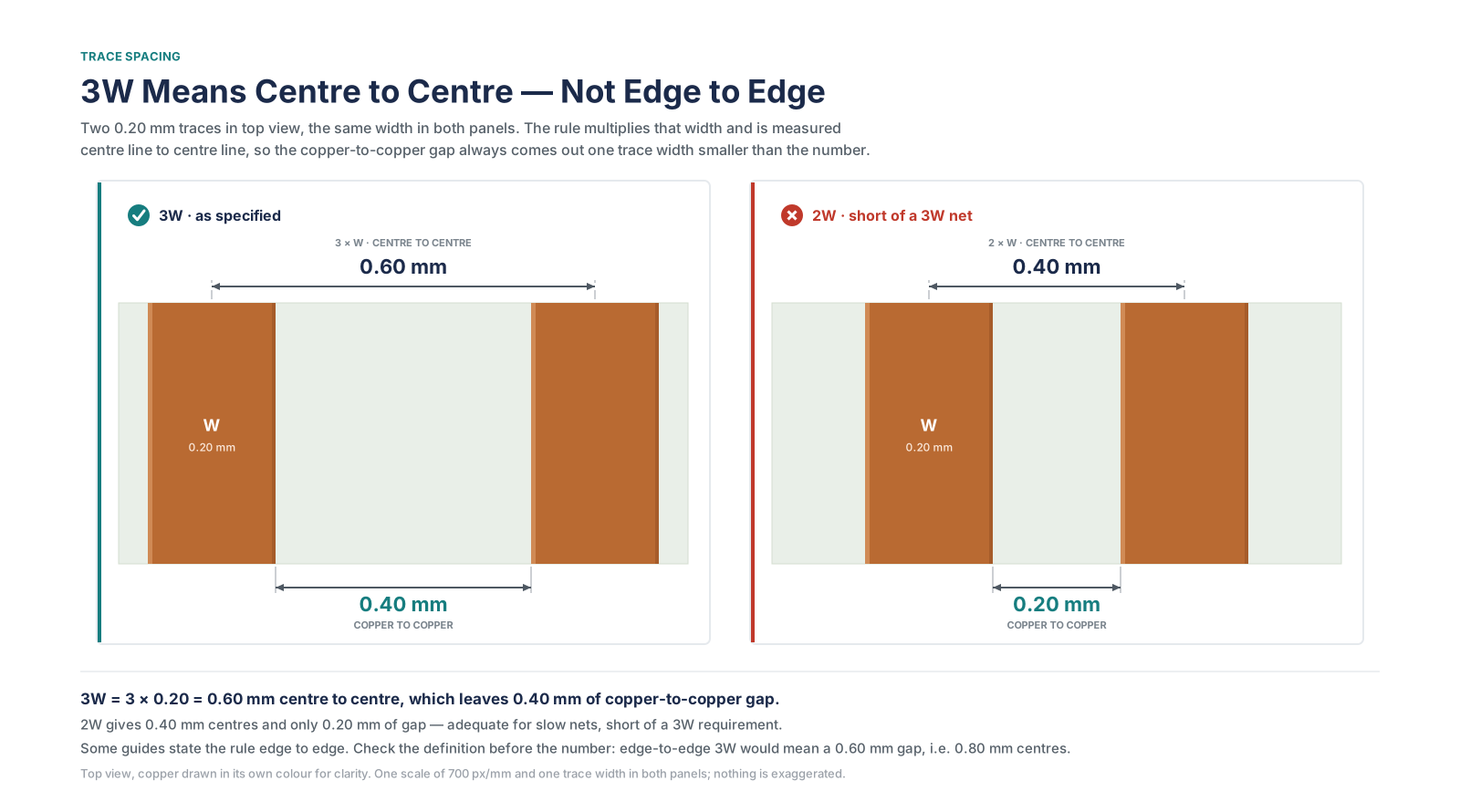
The rule is old, empirical, and widely misquoted. Two details decide whether you are applying it or just saying it:
- Centre to centre, not edge to edge. A 0.2 mm trace at 3W means 0.6 mm between centrelines, which is 0.4 mm of actual gap. If you measure 0.6 mm of gap you have built 4W — safe, but you spent area you did not need.
- It is about parallel runs, not proximity. Two traces that cross at 90° couple for a fraction of a millimetre. Two traces that run side by side for 40 mm couple for 40 mm.
| Guideline | Geometry | What it controls | When it is worth the area |
|---|---|---|---|
| 3W | Centre-to-centre ≥ 3× trace width | About 70% crosstalk reduction | Long parallel runs of fast signals |
| 4W / 5W | 4–5× trace width | Further reduction; used above roughly 500 MHz | DDR, PCIe, RF, fast differential pairs |
| 10W | 10× trace width | About 98% reduction | Only where the victim is extremely sensitive |
| 3H | Spacing ≥ 3× dielectric height | Coupling when the reference plane is far away | Two-layer boards, thick dielectrics |
| 20H | Power plane inset 20H from the ground plane edge | Edge radiation from plane pairs | Multilayer boards with power/ground pairs |
| Guard trace | Grounded trace between victims, stitched to the plane | Shielding; can replace extra spacing | Dense analogue or RF sections |
Why 3W fails on a two-layer board
On a 1.6 mm two-layer board, the dielectric under a top-layer trace is roughly 1.4 mm. Three times the trace width — say 0.6 mm for a 0.2 mm trace — is less than half the distance to the reference plane. The return current is spread wide and the field couples sideways into the neighbour. In that geometry the binding constraint is 3H: about 4.2 mm. Most cheap boards simply cannot afford it, which is why the honest answer for a noisy two-layer design is usually “go to four layers” rather than “space the traces further apart”.
Guard traces and other exceptions
A guard trace is a grounded copper trace run between two victims and stitched to the reference plane with vias every few millimetres. Done properly it is effective and can allow tighter spacing. Done as a floating copper line — no vias, both ends open — it is worse than nothing, because it picks up the aggressor and radiates it into the victim.
Two cases where 3W does not apply at all. Inside a differential pair, the spacing is set by the target impedance, not by crosstalk; widening it to 3W destroys the coupling the pair depends on. And for a short parallel run — under about a quarter of the rise-time electrical length — the coupled energy is too small to matter, so spacing there is wasted area.
3W is not a voltage clearance. It does nothing for arcing, tracking or safety isolation. A board can satisfy 3W everywhere and still fail a 250 V hipot test, because the number that matters there comes from the safety standard, not from crosstalk geometry.
Rules That Get Enforced vs Guidelines You Can Bend
A fabrication constraint is a limit the fabricator’s process physically enforces — if you exceed it, the board cannot be built. A design guideline is a heuristic that may or may not apply to your stackup, your edge rate and your enclosure.
This is the distinction that saves the most time in review. Half of the “rules” repeated in PCB forums are guidelines wearing a uniform.
| Item | Type | Typical limit | Can you bend it? |
|---|---|---|---|
| Minimum trace width / spacing | Constraint | 0.10–0.15 mm at 1 oz; wider at 2 oz | No — but you can pay for a finer process |
| Annular ring | Constraint | Pad − drill, ÷2; typically 0.13–0.20 mm | No; below the minimum the ring breaks out |
| Via aspect ratio | Constraint | 8:1 standard, 10:1 advanced | No; plating will not reach the middle |
| Board edge clearance | Constraint | 0.25 mm minimum, 0.3–0.5 mm recommended | No; routing tolerance removes copper |
| Solder mask dam | Constraint | About 0.10 mm between pads | No; the mask will not hold |
| 45° corners | Guideline | — | Yes. A right angle adds roughly 50 fF; it matters above about 1 GHz, not at 10 MHz |
| Via count | Guideline | — | Yes, within reason; each via adds inductance, not failure |
| Layer count | Cost decision | — | Yes; it changes price and lead time, not correctness |
| Star grounding | Guideline | — | Yes, and often wrong above 1 MHz — use a plane |
About the right-angle myth
The claim that 90° corners cause reflections is mostly folklore below a gigahertz. A right-angle bend adds on the order of 50 fF of excess capacitance — negligible next to a via, which adds far more inductance. Route 45° because it is neat and because acute angles (< 90°) genuinely trap etchant, not because a right angle will break your USB signal.
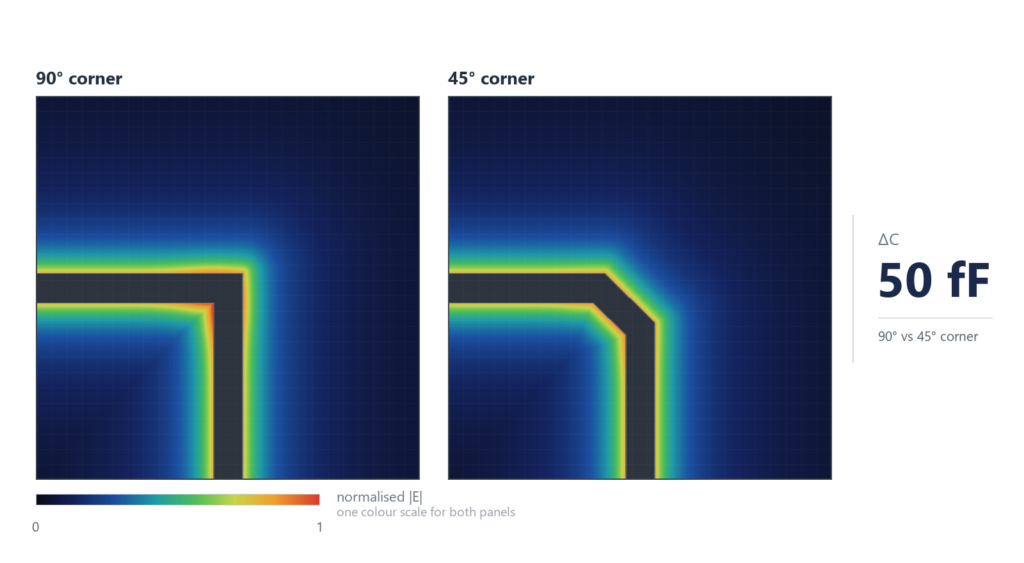
What does matter is what the corner does to length matching. A 90° corner is electrically shorter than two 45° corners by a small amount, and on a matched-length bus those millimetres accumulate. That is a length problem, not a corner problem.
DFM Check Before You Release: The 12 Items That Get Bounced
A DFM review is not a second DRC. DRC checks your own rules; DFM checks those rules against one specific fabricator’s process. These are the twelve items that cause most CAM-stage questions.
| # | Check | What the fab is looking at | Typical reject |
|---|---|---|---|
| 1 | Minimum trace and space vs copper weight | Etch capability at 1 oz or 2 oz | 6 mil features specified on 2 oz copper |
| 2 | Annular ring | Pad diameter minus finished hole | 0.05 mm ring on a 0.3 mm drill |
| 3 | Drill-to-copper | Distance from hole wall to adjacent copper | Hole breaks into a trace on an inner layer |
| 4 | Hole-to-hole web | Remaining material between two holes | Two vias 0.2 mm apart |
| 5 | Aspect ratio | Board thickness divided by drill diameter | 0.2 mm drill in a 2.0 mm board |
| 6 | Solder mask dam | Mask width between adjacent pads | 0.05 mm dam that collapses |
| 7 | Silkscreen over pad | Ink on a solderable surface | Reference designator printed across a pad |
| 8 | Board edge clearance | Copper to the rout path | Copper exposed after routing |
| 9 | Copper balance | Distribution across the panel | A large isolated pour that causes warpage |
| 10 | Via tenting / fill | Mask over vias, or filled vias in pads | Untented via next to a BGA pad |
| 11 | Impedance coupon | Test structures on the panel | No coupon requested for a controlled-impedance stackup |
| 12 | Panel utilization | How the board tiles on the standard panel | A 2 mm strip of wasted panel that adds cost |
Items 11 and 12 are the ones engineers forget, because neither appears in the CAD tool. If you specify controlled impedance, ask for the coupon and the measured result — otherwise you have specified an intention, not a board. If your outline wastes panel area, the quote will carry it and nobody will tell you why.
Run DFM before you order, not after you receive the quote. A fab that finds these issues at CAM will either ask you to redesign or fix them silently and charge for it. Neither is a conversation you want on a deadline.
Gerber, Drill and BOM: What “Design Complete” Actually Means
“The design is done” usually means the layout looks right on screen. What the factory needs is a different set of files, and each one has a failure mode.
| File | What it carries | Common error |
|---|---|---|
| Gerber, one per copper and mask layer | Copper, mask, silkscreen, outline | Wrong layer polarity, missing inner layer |
| NC drill | Hole coordinates, diameters, plated vs non-plated | Different origin from the Gerbers |
| Gerber job file | Stackup and layer order | Omitted; the fab guesses the layer sequence |
| BOM | Reference, quantity, value, MPN, package | Generic value instead of a real MPN; no DNP column |
| Pick-and-place (CPL) | X/Y and rotation for every placed part | Rotation convention differs by tool; bottom-side mirroring |
| Assembly drawing | Polarity, connectors, no-fit areas | Silkscreen obscures the polarity mark |
| Stackup drawing | Dielectric heights, copper weight, impedance targets | Sent as a verbal note rather than a drawing |
A CPL file lists the position and rotation of every component on the assembly, in the machine’s coordinate system. A rotation offset of 90° between the CAD export and the machine library will place every SOP part sideways — which is why assembly houses ask for a first-article report before running the batch.
The split matters: fabrication needs Gerber and drill, assembly needs BOM, CPL and an assembly drawing. Sending all seven to both vendors is the simplest way to avoid a missing file. プリント基板の組立 covers what the assembly side does with them, and choosing a PCBA manufacturer explains how to tell whether the partner you picked will actually check them.
PCB Design: Frequently Asked Questions
Do I need four layers, or will two do?
Two layers are fine for a low-speed board with few parts and no clock above a few tens of megahertz. The moment you have a microcontroller with an external crystal, a switching regulator and a connector carrying a cable off-board, four layers usually cost less than the time you will spend chasing noise on two. The deciding factor is not part count, it is whether you can keep a solid reference plane under every signal.
What trace width do I need for 1 A?
On 1 oz copper with a 10 °C rise, about 0.25 mm on an external layer and 0.5 mm on an internal layer. Those come from the IPC-2221 relationship and assume reasonable airflow. In a sealed enclosure at 60 °C ambient, add 50% and check with the fabricator’s calculator, which probably implements IPC-2152 and will let you go narrower.
Is the 3W rule mandatory?
No. It is a guideline for crosstalk between parallel traces, and it is not a standard requirement. It is worth applying to long parallel runs of fast signals, and it is largely wasted on short runs, low-speed nets and differential pairs. What is mandatory is the voltage clearance from the applicable safety standard, which is a different number.
What is the difference between clearance and creepage?
Clearance is the shortest path through air between two conductors; creepage is the shortest path along the surface of the insulation between them. Creepage is always at least as large because surfaces collect contamination. The distinction only matters when there is a safety requirement — mains, medical, high-voltage DC — but there it decides the layout.
How much spacing do I need for 230 V mains?
It depends on pollution degree, insulation type and whether the gap is coated — which is why no honest answer fits in a table row. For reinforced insulation in a typical indoor product you are usually in the range of several millimetres of creepage, and the number comes from IEC 62368-1 rather than from a PCB design guide. Get the standard, or get the number in writing from the safety lab before you route.
Are 90-degree corners actually a problem?
Below about 1 GHz, no. A right-angle bend adds roughly 50 fF of excess capacitance, which is far less than a single via. The real issues are acute angles below 90°, which trap etchant during fabrication, and length matching on a bus, where the corner geometry shifts the electrical length. Route 45° because it is tidy, not because the signal will fail.
What is the smallest via I should use?
A 0.3 mm drill with a 0.6 mm pad is the comfortable default and costs nothing extra. Going to 0.2 mm starts to raise the aspect ratio and the plating risk; 0.15 mm usually means laser drilling and a higher price tier. If you need microvias, that is an HDI decision, not a routing preference.
Do I need controlled impedance?
If you have USB, Ethernet, HDMI, DDR, PCIe or an RF path, yes. If you have a 16 MHz microcontroller and a relay, no. When you do need it, the stackup sets the impedance and the trace width only fine-tunes it — so specify the stackup and ask for the impedance coupon. A “50 Ω” note without a stackup drawing is not a specification.
How do I know my footprint is correct?
Compare the land pattern to the package drawing in the datasheet, not to the symbol name in your library. Pay attention to pad length and to the distance between pad centres, which is where the 0.1 mm errors live. For fine-pitch parts, print the pattern at 1:1 and place the real component on the paper.
What files does a PCB fab house need?
Gerber files for every copper, mask and silkscreen layer plus the board outline, an NC drill file, and a stackup drawing if impedance or a specific laminate matters. Assembly needs the BOM, a pick-and-place file and an assembly drawing. Send all of them, labelled, in one archive.
Who is responsible for DFM — me or the factory?
You are responsible for the design; the factory is responsible for telling you when the design does not fit its process. In practice the handoff works when the fab runs a DFM check and sends you the report before tooling. If your supplier does not do that, the first article becomes the DFM check, which is the most expensive possible time to find out.
Can you review a design before it goes to fab?
Yes. send us the Gerbers and BOM — Gerbers, drill, BOM and any stackup notes are enough for a first pass. We check the twelve DFM items above and send back a marked-up list with the items that would stop a build, separated from the ones that are merely preferences.
Send the Design Before You Order the Boards
The cheapest moment to find a 0.05 mm annular ring is before the panel is tooled. If you are close to release, send the Gerbers and the stackup notes and we will run them against our process window — send us the Gerbers and BOM and we will come back with the specific list, not a generic checklist.
If you are earlier than that — still choosing between four and six layers, or deciding whether the board needs impedance control at all — start with PCB fabrication to see what our process can hold, and treat this article as the list of questions to bring.

著者について
アンドリュー・ザン – JKRGLO.comの研究開発エンジニア
アンドリュー・ザン氏は、PCB業界において14年以上にわたる研究開発(R&D)エンジニアとしての経験を持ち、回路設計の最適化およびDFM(製造適性設計)の実装に関する深い専門知識を有しています。同氏は、複雑な設計要件を量産対応のソリューションへと具現化することに注力し、試作から量産に至るまでの技術革新を推進しています。.
部門横断的なチームやクライアントと緊密に連携し、プロジェクトのライフサイクル全体を通じて、厳格な品質検証と円滑な技術的コミュニケーションを確保しています。アンドリューは、常にお客様の期待を上回る、信頼性が高く高性能なPCBソリューションの提供に尽力しています。.
目次
 English English English
 Deutsch
 Français
 Italiano
 Español
 日本語
日本語 한국어 English English English Deutsch Français Italiano Español 日本語 한국어