
Circuit Board Components: What Every PCB Part Is Called and How to Identify It
Opening Introduction
Every electronic product, from a $4 phone charger to a data-centre accelerator card, is built on the same two things: a board, and the parts soldered onto it. Get the vocabulary right and everything downstream gets easier, whether you are writing a bill of materials or reading a failure report. Get it wrong and you end up ordering bare boards on the week you needed finished assemblies.
This guide covers the whole picture. What the parts of a circuit board are called, what each type actually does, how to identify a part you are holding when there is no schematic in front of you, and which material and component choices quietly decide whether your build ships on time.
Quick answer
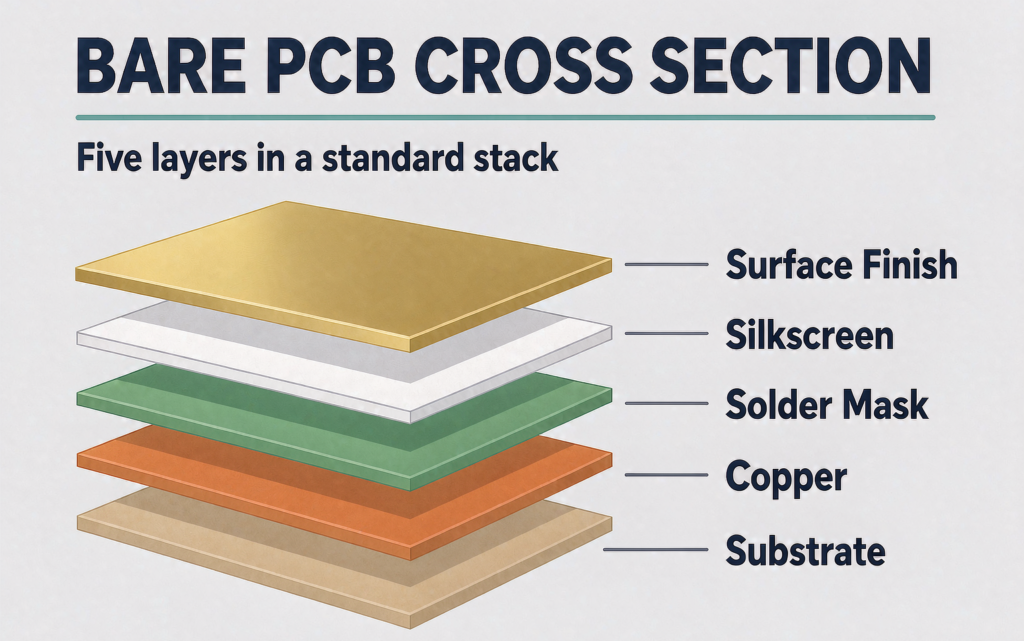
The parts of a circuit board fall into two groups. The board features are built into the bare board during fabrication: substrate, copper traces, pads, vias, solder mask, silkscreen, and surface finish. The circuit board components are the electronic parts soldered onto that board during assembly: resistors, capacitors, inductors, diodes, transistors, integrated circuits, connectors, sensors, and protection devices.
PCB board parts are the electronic components mounted and soldered onto a printed circuit board to make it work. Resistors limit current, capacitors store and filter, inductors and ferrite beads handle magnetic energy and noise, diodes and transistors switch it, integrated circuits process it, and connectors move it on and off the board.
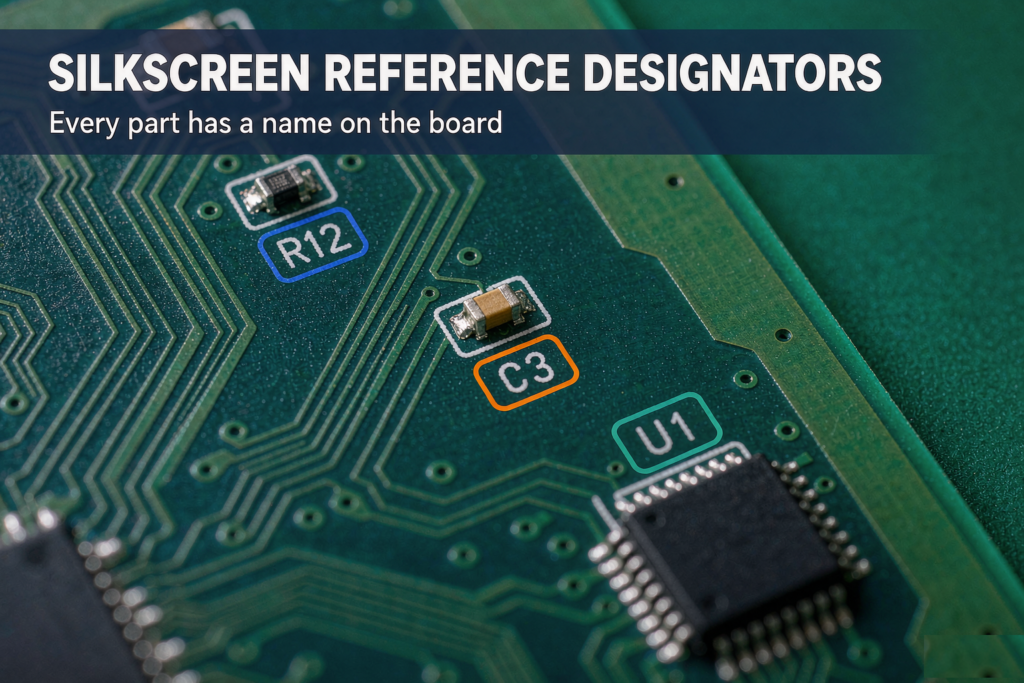
Every part belongs to one of two families. Passive parts store or shape energy and cannot amplify a signal: resistors, capacitors, inductors. Active parts need a power source and can switch, amplify, or process signals: diodes, transistors, ICs. You can tell them apart by the letter printed next to each one on the board. R is a resistor, C is a capacitor, U is an IC.
What Are the Parts of a Circuit Board Called?
Ask ten people and you will get ten answers, because the word “parts” is doing two jobs in that question. A circuit board has board features, the things built into the laminate itself, and it has components, the electronic parts soldered onto the surface. Most confusion about PCB terminology traces back to mixing those two lists up.
The parts of a circuit board are called either board features or circuit board components. Board features are created during PCB fabrication and include the substrate, copper traces, pads, vias, solder mask, silkscreen, and surface finish. Circuit board components are the electronic parts added during assembly and include resistors, capacitors, inductors, diodes, transistors, integrated circuits, connectors, sensors, and protection devices.
| Group | Also called | What it covers | When it is added |
|---|---|---|---|
| Board features | Bare-board structure, PCB features, “the board itself” | Substrate, copper traces, pads, vias, solder mask, silkscreen, surface finish | During PCB fabrication, from Gerber files |
| Circuit board components | PCB board parts, PCB components, electronic components | Resistors, capacitors, inductors, diodes, transistors, ICs, connectors, sensors, fuses | During PCB assembly, from the BOM and pick-and-place file |
That split is not academic. It decides which supplier you talk to. Features come from the PCB fabricator. Components come from the assembly house. Send a fabricator your BOM, or send an assembler your Gerbers with no BOM attached, and you will get a delay instead of a quote.
The seven features of the bare board
| Feature | What it is | What it does | What usually goes wrong |
|---|---|---|---|
| Substrate | The insulating base. FR-4 glass-reinforced epoxy on the majority of boards | Gives the board rigidity and keeps the copper layers electrically separated | Warping during reflow when the Tg rating is too low for the process |
| Copper traces | Etched copper pathways, commonly 35 µm (1 oz) thick | Carry signals and power between pads | Opens from over-etching; crosstalk when parallel traces sit too close |
| Pads | Exposed copper areas where component terminals are soldered | Create the solderable landing zone for each terminal | Tombstoning or non-wetting when the pad does not match the datasheet |
| Vias | Plated holes that connect traces on different layers | Let a signal change layers without a wire | Voids inside the barrel; solder wicking during assembly |
| Solder mask | The green, blue, black, or red polymer coating over the copper | Stops solder bridging between adjacent pads and protects the surface | Bridging between fine-pitch pins when the mask dam is too narrow |
| Silkscreen | The white printed text, reference designators, and polarity marks | Tells you what each part is and which way round it goes | Unreadable labels when print overlaps a pad or via |
| Surface finish | The coating on exposed copper: HASL, ENIG, OSP, immersion silver | Stops oxidation and keeps pads solderable |
What Is a PCB, and What Does It Actually Do?
A printed circuit board (PCB) is a flat insulating board with copper pathways printed on it, used to mechanically support and electrically connect electronic components. The board itself performs no circuit function. It is the platform that holds the parts and wires them together in a pattern that repeats exactly on every unit you build.
If you want the fabrication side of that story, we cover it step by step in how printed circuit boards are made.
The board does three jobs, and only the first one is obvious.
- Mechanical support. It holds every component in a fixed position through soldering, vibration, and drops. A connector that flexes on its pads will eventually crack its joints.
- Electrical connection. Copper traces replace point-to-point wiring. Because they are etched from a single artwork, every board from a production run is wired identically.
- Field management. At modern edge rates a PCB does not just route electricity, it manages electromagnetic fields. Every trace behaves as an antenna, a capacitor, or an inductor whether you intended it to or not.
That third job is where hardware teams get ambushed. A client of ours built an IoT environmental sensor and spent six months on firmware. The device reset every few hours on the bench. The software team rewrote memory handling three times before anyone looked at copper. A high-speed clock trace ran directly underneath the analog reference line, and the digital signal was coupling enough energy into that reference to trip the brown-out detector. The fix was moving one trace two millimetres to the left and adding a ground plane. Firmware was never the problem.
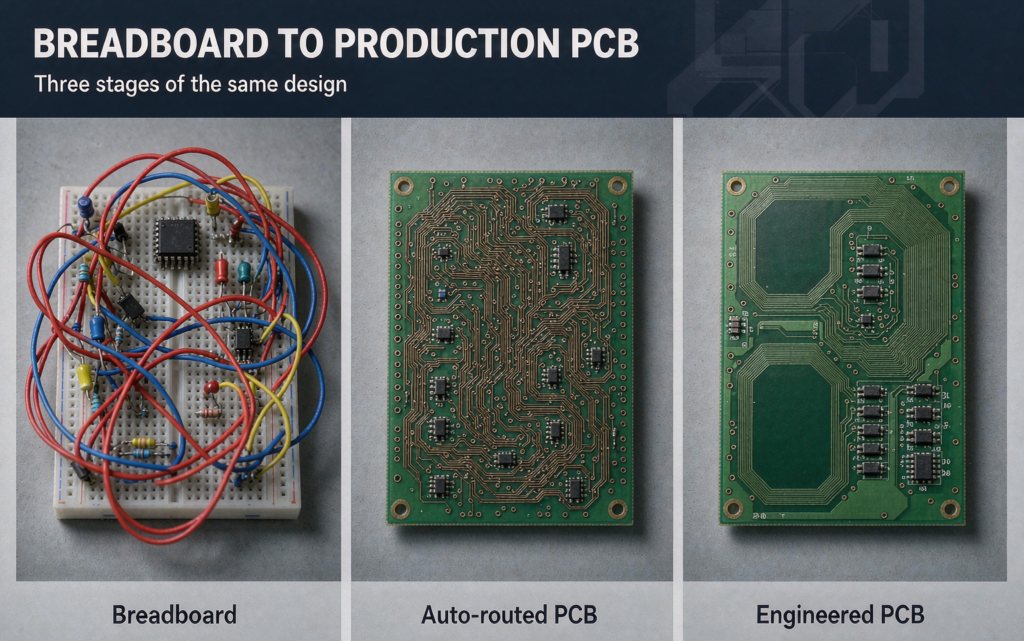
Same circuit, three different foundations, three completely different outcomes:
| Foundation | Good at | What it does to your circuit | Verdict |
|---|---|---|---|
| Breadboard | Proving basic logic in minutes | Adds parasitic capacitance that turns anything above roughly 1 MHz into mush | Fine for teaching. Never trust its timing |
| Auto-routed PCB | Connecting every net without thinking | Ignores impedance and return paths entirely | A reliable way to fail EMC testing |
| Engineered PCB | Surviving the real world | Controls impedance, moves heat away from regulators, provides a solid ground reference | The only option for a product that ships |
PCB or PCBA? The distinction that costs money
A PCB is the bare, unpopulated board. Once components are soldered onto it, the same board becomes a PCBA, a printed circuit board assembly. The two are quoted, sourced, and inspected as separate items, which is why mixing the terms up leads to wrong quotes and wrong orders rather than simple embarrassment.
We once received a smart-lock design where the engineer had specified solder pads 0.2 mm smaller than the component pins, because he assumed a PCB arrived with parts already on it. The prototype batch came back un-solderable. Two weeks and roughly $3,000 went into boards that never worked. See what PCB assembly covers if that boundary is fuzzy on your side too.
PCB Board Parts: The Two Families of Circuit Board Components
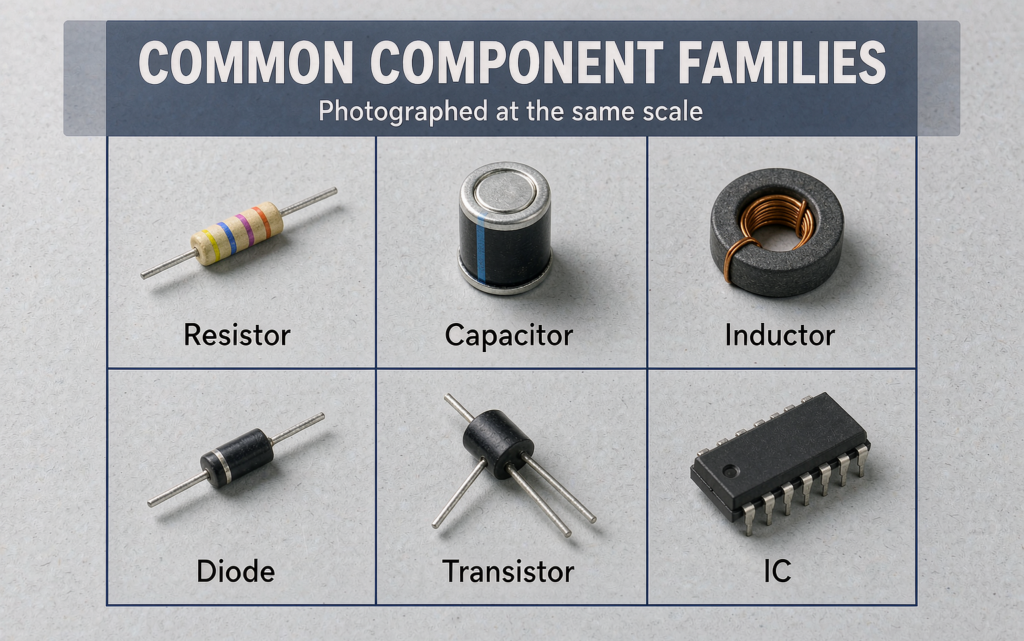
Passive components store or shape electrical energy without amplifying it. They are resistors, capacitors, and inductors. Active components need an external power source to switch, amplify, or process signals. They are diodes, transistors, and integrated circuits. Almost every part on a board belongs to one of those two families, or to the electromechanical, protection, and sensing groups that support them.
There are hundreds of thousands of part numbers in distribution, but the practical list is short. Nearly everything on a board fits one of five categories:
| Category | Energy behaviour | Core job | Typical parts | Reference letters |
|---|---|---|---|---|
| Passive | Stores or releases energy, never adds net power | Set currents and voltages, filter noise, provide timing | Resistor, capacitor, inductor, ferrite bead, crystal | R, C, L, FB, Y |
| Active | Draws power and controls the flow of it | Switch, amplify, process, and communicate signals | Diode, transistor, MOSFET, integrated circuit | D, Q, U |
| Electromechanical | Converts electricity into motion or a physical connection | Connect the board to cables, users, and other boards | Connector, switch, relay, buzzer | J, P, SW, K, LS |
| Protection | Diverts or interrupts current and voltage | Survive overcurrent, surges, and static discharge | Fuse, TVS diode, MOV, PTC | F, D, RV |
| Sensing | Converts a physical quantity into a signal | Feed temperature, light, motion, or pressure data to the ICs |
If you need the broader taxonomy of board construction, the three main types of PCBs is the companion read. This page stays on the parts themselves.
Passive Components: Resistors, Capacitors, and Inductors
Passive parts cannot add energy to a signal and do not need a supply rail to work. Five of them cover almost everything you will meet.
Resistors (R)
Limit current, divide voltage, and set bias points. Resistors outnumber every other part on most boards, because almost every circuit needs current limiting or a pull-up somewhere. Surface-mount resistors carry their value as a printed code rather than colour bands, and the formats are worth memorising:
- Three-digit code on 5% parts: first two digits are the value, third is the number of zeros.
103= 10 × 10³ Ω = 10 kΩ - Four-digit code on 1% precision parts: first three digits plus a multiplier.
1002= 100 × 10² Ω = 10 kΩ - EIA-96 code on 0603 and smaller: two digits plus a letter, read from a lookup table.
01C= 10 kΩ - The letter R marks the decimal point.
4R7= 4.7 Ω
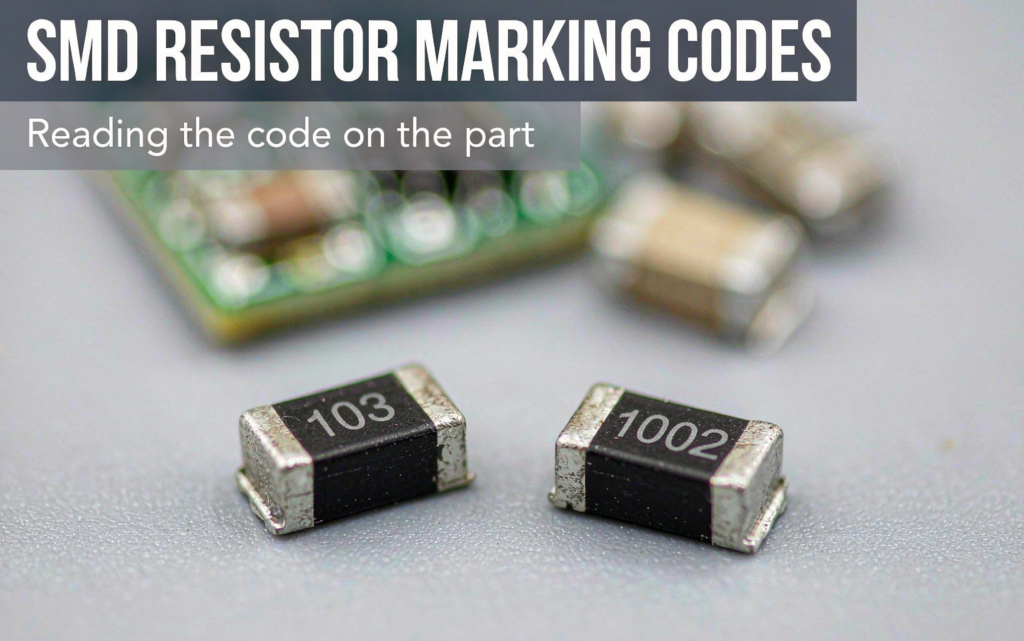
Imperial package sizes in common use run 0201, 0402, 0603, 0805, 1206, and 2512. Watch the naming trap: datasheets frequently list 0402 as 1005, which is the same part described in metric dimensions.
Capacitors (C)
Store charge, pass AC, block DC, and keep noise off power pins. Three types dominate every board you will open:
- MLCC (ceramic) — unmarked tan or beige chips, non-polarised, and the bulk of what sits on a phone board. Values are usually not printed, so you read them from the BOM or measure them.
- Tantalum — moulded rectangular chips where the painted stripe marks the positive terminal.
- Aluminium electrolytic — cylindrical cans where the stripe marks the negative terminal.
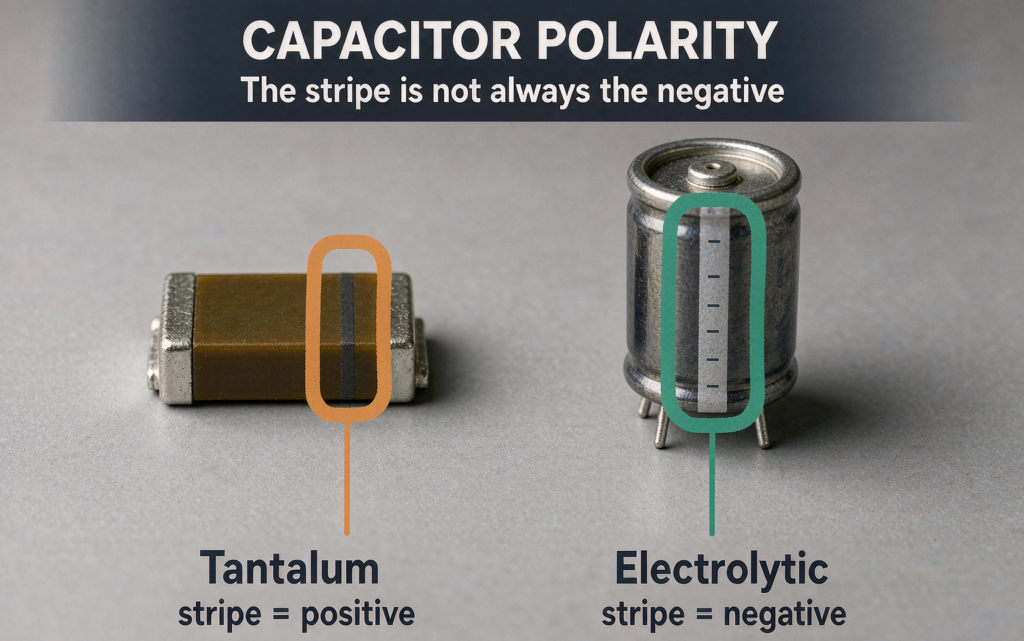
Polarity is reversed between tantalum and electrolytic capacitors. Reversing an electrolytic capacitor usually kills the capacitor. Reversing a tantalum capacitor can short it, overheat it, and set it on fire. If you remember one polarity rule from this page, make it that one. Reversing either type is one of the few mistakes that damages the board as well as the part.
Inductors and ferrite beads (L, FB)
Store energy in a magnetic field and resist sudden changes in current. Inductors run switch-mode supplies and DC-DC converters. Ferrite beads look like small chip resistors, are usually unmarked, and act as high-frequency filters on supply lines going to sensitive sections. Values use the same R-for-decimal rule: 4R7 = 4.7 µH.
Crystals and oscillators (Y, X)
Provide the clock every processor needs. A silver metal can sitting near the main IC, often printed with a frequency such as 16.000, is a crystal.
Transformers
Step voltage up or down and isolate one circuit from another. On a board, finding a transformer usually means mains or PoE power is being converted somewhere close by.
Active Components: Diodes, Transistors, and Integrated Circuits
Active parts draw power and shape a signal rather than merely passing it. This is also the family that produces the most expensive mistakes, because packages that look identical can behave completely differently.
Diodes (D)
A diode lets current flow one way and blocks it the other. Everything else in the family is a variation on that theme:
- Rectifier diode — the workhorse of power supplies, marked with a cathode band on one end
- Schottky diode — lower forward drop (0.2–0.4 V against 0.5–0.7 V) and faster switching, used in switching supplies
- Zener diode — runs in reverse breakdown to hold a steady reference voltage
- LED — emits light when forward biased, with the cathode marked by a flat edge, a green dot, or a shorter lead depending on package
Here is what that costs when nobody checks. A medical-device client received 5,000 assembled power boards that caught fire the moment they were plugged in. Two days of teardown found the cause: the BOM listed a 1N4007 rectifier while the design needed a 12 V Zener. Both parts are small black cylinders, and both carry the same reference designator, D. Nobody had read the part number printed on the body. Rework came to $25,000 and an FDA submission slipped six weeks.
The silkscreen tells you the component category. The marking printed on the component body tells you the part. Treating the first as proof of the second is the single most expensive habit in incoming inspection.
Transistors and MOSFETs (Q)
Solid-state switches and amplifiers. MOSFETs handle power switching, so you find them at motor drives, charger outputs, and load switches. Small-signal transistors handle sensing and pre-amplification. Common packages are SOT-23 and SOT-223 for surface mount, TO-92 for low-power through-hole work, and TO-220 wherever a part needs a heatsink tab.
Integrated circuits (U, IC)
An integrated circuit (IC) is a single package containing a complete electronic circuit, from a handful of transistors to several billion of them, that handles processing, memory, power management, or communication on a board. ICs are the highest-value and highest-risk line items on most BOMs, and the ones most likely to be single-sourced.
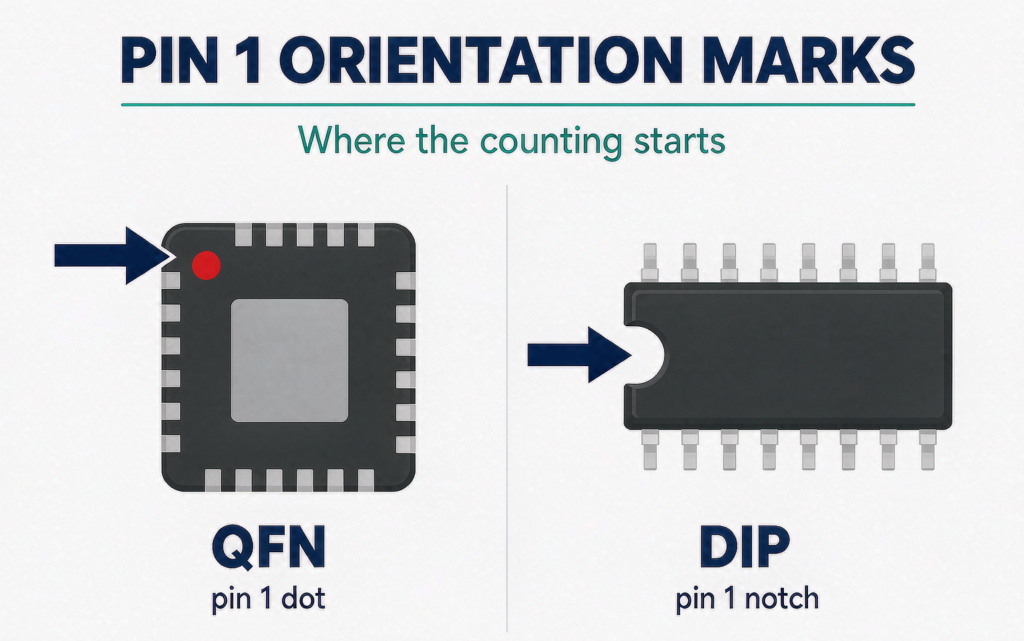
Finding pin 1 matters more than anything else about an IC, because getting it wrong rotates the part and usually destroys it on power-up. On a QFN or QFP, look for a laser-etched dot in one corner or a chamfered edge. On a DIP or SOIC, look for the half-moon notch: hold the part with the notch pointing up and pin 1 is the first pin at the lower left. On a BGA, look for a corner triangle or index dot on the substrate.
Package families you will see named in drawings: SOIC, TSSOP, QFP, QFN, LGA, and BGA. You can browse the fabrication capabilities behind them if you need to know which of those your supplier can actually place and inspect.
Connectors, Switches, Protection, and Sensor Parts
Interconnect and electromechanical parts
These are the parts a person or a cable touches.
- Connectors (J, P) — USB ports, pin headers, board-to-board stacks, terminal blocks, RF connectors
- Switches (SW) — tactile buttons, slide switches, DIP switches used for configuration
- Relays (K) — electrically operated switches that let a low-power circuit control a high-power load with isolation between the two
- Buzzers, speakers, motors, fans (LS) — parts that turn electricity into sound or motion
Connectors absorb the mechanical abuse on most products, which is why they often stay through-hole even on a fully surface-mount board. A USB port soldered only to surface pads will eventually lift its pads off the laminate, and no amount of solder mask will prevent it.
Protection parts
These exist so that nothing else has to fail.
- Fuses (F) — melt or trip when current exceeds a safe level. PTC resettable versions recover once the fault clears and the part cools.
- TVS diodes — clamp fast voltage spikes such as an ESD event on a connector shell
- MOVs (RV) — absorb surge energy on mains-powered inputs
Sensors
Any board that meets the physical world carries sensors: thermistors and RTDs for temperature, accelerometers and gyroscopes for motion, Hall-effect parts for magnetic position, photodiodes for light, and pressure or humidity sensors. Each one converts a physical quantity into a voltage or a digital word the ICs can read.
Robotics and high-density designs push this group hardest. If that is your world, HDI for robotics assemblies picks up the layout consequences.
Reference Designators: The Letters Printed on Every Circuit Board
A reference designator (ref des) is the short alphanumeric code printed on the silkscreen next to a component that identifies its type and its instance in the design, such as R12 for a resistor or U3 for an integrated circuit. The letter gives the category. The number ties the physical part to its schematic symbol and its line in the bill of materials.
The prefixes follow long-standing industry convention, though every company library varies a little at the edges. Learn this table and you can read the majority of any board you pick up:
| Ref des | Component | How to spot it on the board | Sourcing risk |
|---|---|---|---|
| R | Resistor | Small rectangular chip, often black, with a printed code. Leaded parts have colour bands | Low. Many second sources |
| C | Capacitor | Unmarked tan or grey chip (ceramic); cylinder or moulded block with a stripe (electrolytic, tantalum) | Low for ceramics. Medium for high-voltage or automotive grades |
| L | Inductor | Square or round moulded block, sometimes with visible winding | Medium. Footprint and saturation current limit alternatives |
| FB | Ferrite bead | Looks like a chip resistor or capacitor, usually unmarked | Low to medium |
| D | Diode, LED | Two-terminal part with a cathode band or a marked end | Low for generic parts. Medium for TVS and specialised diodes |
| Q | Transistor, MOSFET | Three-lead SOT-23, or a larger package with a metal tab for heat | Medium. Check pinout before substituting |
| U, IC | Integrated circuit | Multi-pin package with a pin-1 dot or notch, usually the largest part on the board | High. Often single-source with the longest lead times |
| J, P | Connector | Anything with a hole, pin, or socket, usually at the board edge | Medium. Gender, pitch, and pin count must match exactly |
| SW | Switch | Button or sliding mechanism | Low |
| F | Fuse | Small glass or ceramic cylinder, or a chip labelled with an amp rating | Low |
| Y, X | Crystal, oscillator | Silver metal can near the main processor | Medium |
| TP | Test point | Small labelled pad intended for a probe | None |
With the silkscreen intact, the ref des plus the package shape narrows almost any part to a handful of candidates. The part number printed on the body finishes the job.
How to Identify a Circuit Board Component When the Silkscreen Is Gone
Worn, scratched, or simply absent silkscreen is the normal condition on older boards, and it is where most people give up. Three tools, used in order, resolve the large majority of cases.
1. Work out what the package can be
Package size and pin count cut the search space fast. Two pins means a resistor, capacitor, inductor, or diode. Three leads narrows to a transistor, a regulator, or a small diode array. Eight to 64 pins is an IC. A large multi-row package with a metal tab is power electronics. Shape and pin count rarely give you the exact part, but they eliminate most of the field.
2. Read the marking on the body
Genuine components almost always carry something. Resistors have their numeric code. Capacitors carry capacitance and voltage, or nothing at all if they are ceramic. ICs carry a full part number plus a date or batch code, which is also how you spot re-marked stock. For 0402 and smaller you need magnification, and a $15 loupe is enough to work with.
3. Test it with a multimeter
This is what separates a guess from an answer.
- Resistor. Set the meter to resistance and probe across the part. If the reading sits outside the expected tolerance band, the resistor has failed open. In-circuit readings run low because of parallel paths, so desolder one lead before you trust the number.
- Diode or PN junction. Use diode test mode with the red lead on the anode. A healthy silicon junction reads 0.5–0.7 V forward, or 0.2–0.4 V for a Schottky. Reverse the probes and it should read OL, open loop.
- Ceramic capacitor. Switch to continuity and probe across the terminals. A continuous beep or a near-zero reading means the dielectric has broken down and the part is shorted to ground. Note that a healthy MLCC also reads close to a short in circuit, so compare against an identical part on the same board before condemning it.
Spotting counterfeit or refurbished parts
The first warning is a marking that looks slightly faded, uneven, or blurred under magnification. Others include a package colour that does not match the datasheet photo, pins that are rough or bent, and part numbers that do not appear in the manufacturer’s own documentation. Sanded and re-printed markings are common on refurbished stock, and at arm’s length they look almost right, which is exactly the problem.
If a component is priced 50% below the authorised distributor, treat it as counterfeit until it is proven otherwise. That threshold is not a guess. Legitimate excess and broker stock exists, but the discount is usually a few percent, not half. The moment the price stops making sense, the paperwork usually stops surviving an audit.
SMD vs Through-Hole: Two Ways Circuit Board Components Attach
Surface-mount devices (SMD) are soldered directly onto copper pads on the board surface. Through-hole (THT) components have leads that pass through drilled holes and are soldered on the opposite side. Most modern boards use both, choosing per part rather than per product.
| Factor | SMD (surface mount) | Through-hole (THT) |
|---|---|---|
| Size | Down to 01005, or 0.4 × 0.2 mm | Larger and much easier to handle |
| Assembly | Pick-and-place machine plus reflow oven | Manual, wave, or selective soldering |
| Cost at volume | Low. Fully automated | Higher. More labour content per joint |
| Mechanical strength | Solder joints only, and they can crack under stress | Leads clamped through the board, very robust |
| Hand repair | Difficult. Needs hot air and magnification | Easy with an iron |
| Typical use | Phones, laptops, high-volume electronics | Connectors, power parts, industrial boards |
The rule of thumb: SMD wherever density and cost matter, through-hole wherever a part takes mechanical load or needs to be replaced in the field. A board that mixes both deliberately is usually the sign of a team that has built something before.
What Is the Most Common PCB Material?
FR-4 is the most common PCB material: a woven fibreglass fabric bonded with epoxy resin, laminated into sheets and clad with copper foil. Industry estimates put FR-4 at roughly 85% of global PCB production. It is not the best material at anything in particular. It has the best average at everything that decides whether your build ships.
Every fabricator on the planet is set up to drill, plate, and etch FR-4. They know its quirks. Switch to something less common and you buy longer lead times, higher setup charges, and more room for process error, usually without a benefit your design can actually use.
The one specification worth understanding: Tg
Tg is the glass transition temperature, the point where the resin softens and the laminate starts to move. Standard FR-4 sits around 130–140 °C. High-Tg FR-4 pushes past 150 °C, and it is what you want if the board sees sustained heat, repeated reflow cycles, or a hot lead-free profile. If your design runs hot, the answer is almost always high-Tg FR-4 rather than a different material family.
| Material | Typical use | Relative cost, 1.6 mm two-layer | Watch out for |
|---|---|---|---|
| Standard FR-4 | Consumer electronics, IoT, industrial controls | Low | Weak signal performance above roughly 10 GHz |
| High-Tg FR-4 | Boards with sustained heat or lead-free reflow | Slightly higher | Confirm availability at your fabricator before layout |
| Halogen-free FR-4 | Products sold into EU and US environmental mandates | Slightly higher | Fewer sources. Insist on a certified grade |
| CEM-1 | Cheap single-sided consumer boards | Lowest | Not suitable for multilayer. Weak mechanically |
| Aluminium MCPCB | LED lighting, high-power supplies | Medium to high | Simple layer counts only |
| Rogers, PTFE | 5G mmWave, RF, aerospace | Highest | Only worth the cost above roughly 10 GHz |
| Polyimide (flex) | Wearables, cameras, medical catheters | Medium to high | Needs flex-specific DFM rules from the start |
We see the opposite mistake just as often: paying for performance nobody asked for. A startup founder burned about $12,000 on prototypes built on aerospace-grade high-frequency laminate for a smart garden sensor that talks over 2.4 GHz Wi-Fi. Standard FR-4 would have done the job for a fraction of the cost and shipped two weeks sooner.
Leave the FR-4 family when, and only when, you have a requirement it genuinely cannot meet: mmWave above 10 GHz with a tight dielectric tolerance, extreme thermal loads, repeated flexing, or radiation and biocompatibility requirements. For flexible designs, flexible circuit boards are a different engineering problem, not a material swap. Everything else is FR-4, and high-Tg FR-4 if it runs hot.
How to Choose Circuit Board Components That Won’t Stall Your Build
Value, package, voltage rating, and current rating are the checks everyone makes. These five are the ones that turn into money and schedule.
- Temperature rating. Consumer parts are typically rated to 85 °C. Industrial designs often need 105 °C or 125 °C parts. A capacitor that measures perfectly on the bench can dry out inside an enclosure that soaks at 90 °C.
- Availability and lifecycle. A perfect part that is end-of-life, or on a 26-week lead time, will stall an entire build. Check availability before you finish the layout, not after.
- Second sources. An approved alternate for every critical line is what protects you the week your primary part goes on allocation.
- Footprint compatibility. If two suppliers’ supposedly identical parts have different recommended pad geometries, a late swap can cause tombstoning or poor joints during reflow.
- Compliance. Most markets require RoHS-compliant parts. Automotive and medical designs add their own qualification lists on top, and those lists are not negotiable after the fact.
Getting the parts list right is half the job. Sourcing every line item on time is the other half, and it is the reason the BOM should reach your assembly partner at quotation stage rather than after the design is frozen. If supplier selection is on your list too, how to choose a PCBA manufacturer covers the audits worth running.
Frequently Asked Questions
1. What are the parts of a circuit board called?
The parts of a circuit board are split into two groups. Board features — substrate, copper traces, pads, vias, solder mask, silkscreen, and surface finish — are built into the bare board during fabrication. Circuit board components — resistors, capacitors, inductors, diodes, transistors, ICs, connectors, and protection parts — are soldered onto the surface during assembly.
2. What are PCB board parts?
PCB board parts are the electronic components mounted and soldered onto a printed circuit board to make it function. The term covers passive parts (resistors, capacitors, inductors), active parts (diodes, transistors, ICs), electromechanical parts (connectors, switches, relays), protection parts (fuses, TVS diodes), and sensors.
3. Is “PCB board parts” the same as “circuit board components”?
Yes. PCB components, PCB parts, circuit board components, and electronic components all refer to the parts mounted on a printed circuit board. None of them includes the bare board itself, which is a separate item made by the PCB fabricator and quoted separately from assembly.
4. What does a PCB board actually do?
A PCB does three jobs. It mechanically supports every component in a fixed position, it electrically connects them through etched copper traces instead of hand wiring, and it manages heat and electromagnetic behaviour so that high-speed signals survive contact with the physical world. The components do the electrical work. The board is what makes that work repeatable across thousands of units.
5. What is the most common PCB material?
FR-4, a woven fibreglass and epoxy laminate, used in roughly 85% of global PCB production by industry estimate. It is inexpensive, every fabricator knows how to process it, and it is good enough for almost every design that does not involve mmWave frequencies, extreme heat, or repeated flexing. High-Tg FR-4 covers most designs that run hot.
6. What is the most common component on a PCB?
Resistors. Almost every circuit needs current limiting, voltage division, or a pull-up somewhere, so resistors appear in larger numbers than any other part. Capacitors are a close second, mostly decoupling the power pins of ICs.
7. What is a reference designator on a PCB?
A reference designator is the alphanumeric label printed on the silkscreen next to each component, such as R101, C202, or U1. It links the physical part to its schematic symbol and its line in the bill of materials. The letter indicates the component type and the number identifies that specific instance on that specific board.
8. How do I identify a component if the silkscreen is worn off?
Work through three tools in order. First, package size and pin count, which eliminates most of the field. Second, the marking printed on the body, read under magnification if necessary. Third, a multimeter: diode test mode separates diodes and transistors from other three-lead parts, resistance testing identifies resistors, and continuity catches ceramic capacitors that have shorted. If the marking is unreadable, photograph the part and send it to your manufacturer with the BOM.
9. What is the difference between SMD and through-hole components?
SMD parts solder flat onto copper pads on the board surface and are placed by automated machines, which makes them small and cheap at volume but harder to repair by hand. Through-hole parts have leads that pass through drilled holes and are soldered on the opposite side, which makes them larger and far more mechanically robust. That is why connectors and power parts often stay through-hole even on an otherwise surface-mount board.
10. Can I tell whether a component is counterfeit?
Look for markings that are faded, uneven, or slightly blurry under magnification, package colours that do not match the datasheet, pins that are rough or bent, and part numbers that do not appear in the manufacturer’s own documentation. Refurbished parts often have sanded and re-printed markings. As a working rule, a price 50% below the authorised distributor is not a bargain.
11. Do PCB components wear out?
Yes. Electrolytic capacitors are usually first, because heat dries out the electrolyte, so their life is measured in thousands of hours at rated temperature rather than a fixed number of years. Connectors wear out from mating cycles, relays from switching cycles, and semiconductors degrade slowly under sustained heat and electrical stress. Thermal margin extends component life more than any other single design decision.
Get the Parts List Checked Before You Build
If a component on your board is unidentified, or your BOM has not been reviewed against the design, that is the cheapest thing to fix and the most expensive thing to discover later. Send us your Gerbers, BOM, and a photo of anything uncertain, and our engineering team will run the review alongside your quote.
Start a PCB or PCBA quote · Capabilities and certifications · PCB fabrication services
JKRGLO is a one-stop PCB and PCBA manufacturer operating since 2012, combining PCB fabrication, component sourcing, and assembly under one roof.
About US
You may also be interested in…

About the Author
Andrew Zhan – R&D Engineer at JKRGLO.com
With over 14 years of R&D engineering experience in the PCB industry, Andrew Zhan brings deep expertise in circuit design optimization and DFM implementation. He focuses on translating complex design requirements into production-ready solutions, driving technical innovation for both prototype and mass production.
Working closely with cross-functional teams and clients, he ensures rigorous quality validation and seamless technical communication across the full project lifecycle. Andrew is committed to delivering reliable, high-performance PCB solutions that consistently exceed customer expectations.
Table of Contents
Still, need help? Contact Us:
Need a PCB or PCBA quote?
Tag:
best pcb manufacturers
PCBA
PCB
circuit board components
PCB components