
XNOR Gate Truth Table: Boolean Expression, Symbol & Practical Circuit Guide
Opening Introduction
Quick Answer:The XNOR gate (exclusive NOR) outputs HIGH (1) only when all of its inputs are equal — both 0 or both 1 for a 2-input gate. Its core truth table reads: 00→1, 01→0, 10→0, 11→1. Also called an equivalence gate, it is the logical complement of the XOR gate, and is widely used in even parity checking, equality comparators, and address decoding circuits on PCBs.
What Is an XNOR Gate?
It’s the exact complement of the XOR (exclusive OR) gate. Where XOR outputs 1 for mismatched inputs, XNOR outputs 1 for matched inputs. The two are so closely tied that most datasheets list them side by side, and many standard IC packages include both gate types in a single chip.
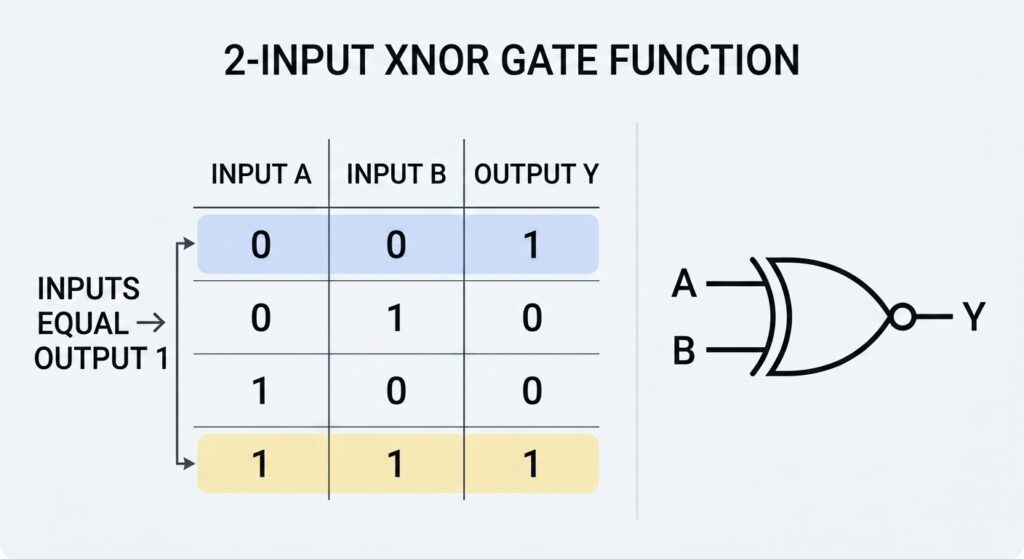
2-Input XNOR Gate Truth Table
The 2-input XNOR truth table is the version you’ll use 90% of the time in standard digital design. It maps every possible combination of two binary inputs to the corresponding output.
| Input A | Input B | Output Y (A ⊙ B) |
|---|---|---|
| 0 | 0 | 1 |
| 0 | 1 | 0 |
| 1 | 0 | 0 |
| 1 | 1 | 1 |
Let’s walk through each row to make the logic clear:
- When both A and B are LOW (0,0): The inputs match, so the XNOR output is HIGH (1).
- When A is LOW and B is HIGH (0,1): The inputs differ, so the output is LOW (0).
- When A is HIGH and B is LOW (1,0): The inputs differ, so the output is LOW (0).
- When both A and B are HIGH (1,1): The inputs match, so the output is HIGH (1).
This “same = 1, different = 0” pattern is the easiest way to memorize the XNOR truth table. If you ever get confused mid-debug, just remember: XNOR = same outputs 1.
Boolean Expression of the XNOR Gate
From the truth table, we can derive the standard Boolean expression for the XNOR operation. We sum the product terms for every row where the output equals 1:
A ⊙ B = AB + A’B’
Here, A' and B' represent the logical NOT (inversion) of inputs A and B. The expression reads as “A AND B, OR NOT A AND NOT B” — which directly matches the two rows of the truth table that produce a HIGH output.
A very useful identity to remember is that XNOR is simply the inverse of XOR:
A ⊙ B = (A ⊕ B)’
This is handy in circuit design. If you only have an XOR gate on hand, you can add a single NOT gate (or tie the output to an inverter) and get XNOR functionality without swapping components.
XNOR Gate Circuit Diagram
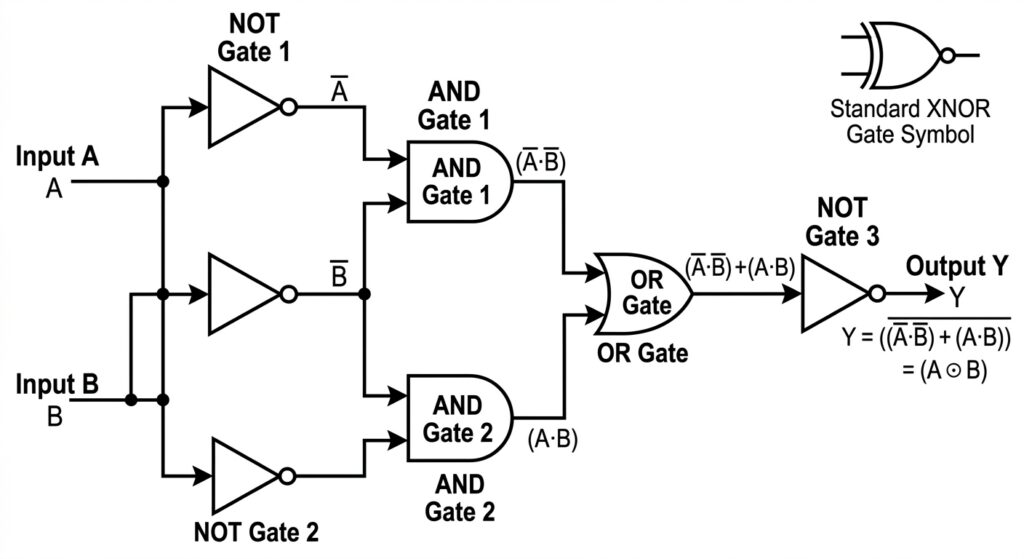
Like all standard logic gates, the XNOR can be constructed from combinations of simpler gates. This is useful knowledge for both understanding how the gate works at the transistor level, and for troubleshooting designs built from universal gate arrays.
Built from AND, OR, and NOT Gates
The most straightforward implementation uses two AND gates, one OR gate, and two NOT gates:
- Feed both inputs directly into the first AND gate (produces the
ABterm). - Invert both inputs with NOT gates, then feed them into the second AND gate (produces the
A'B'term). - Feed the outputs of both AND gates into an OR gate.
- The output of the OR gate is the final XNOR result.
This construction directly mirrors the Boolean expression, making it easy to verify against the truth table.
Built from NAND Gates Only
NAND gates are universal gates, meaning you can build any other logic function using only NAND gates. To build an XNOR entirely from NAND gates:
- Build an OR gate structure using two NAND gates with inverted inputs.
- Build an AND gate structure using three NAND gates.
- Combine the two stages with a final NAND gate configured to act as AND with inverted inputs.
While it takes more components, this is a common approach in programmable logic and ASIC design where NAND gates are the most abundant cell type.
Built from NOR Gates Only
You can also construct an XNOR using only NOR gates, another universal gate type:
- Build an AND gate using three NOR gates.
- Build an OR gate using two NOR gates.
- Combine the outputs with a final NOR gate arranged to produce the equivalence function.
Logical Symbol of the XNOR Gate
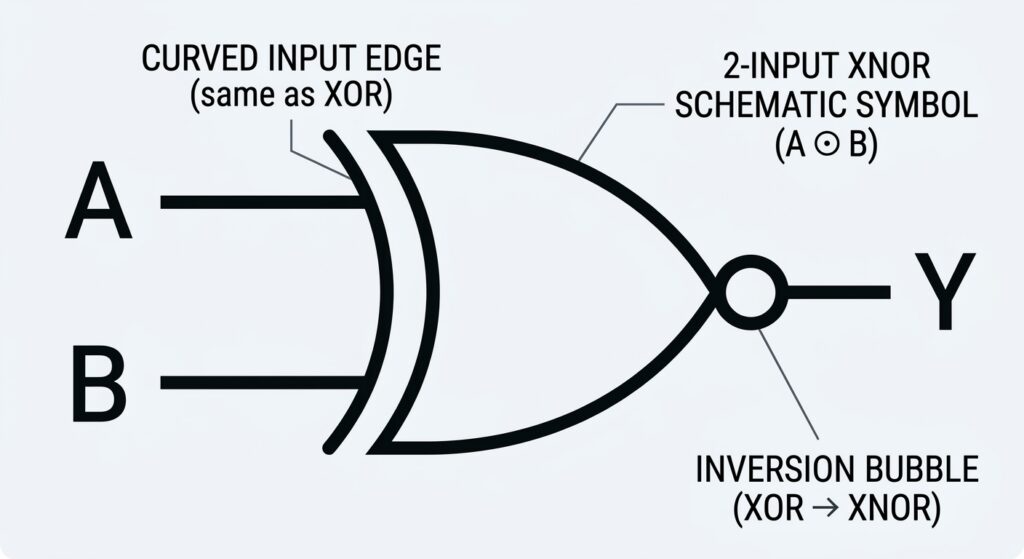
The standard schematic symbol for an XNOR gate is easy to recognize once you know the convention. It uses the same curved-body shape as an OR gate, with an extra curved line just behind the input terminals — the same marker used for XOR. The key difference is a small inversion bubble (circle) at the output terminal.
That output bubble is the universal schematic notation for logical inversion. It tells you at a glance: this is an XOR gate, but the output is flipped.
In Boolean algebra and equations, the XNOR operation is denoted by the dot-in-circle symbol: ⊙ So A XNOR B is written as: A ⊙ B
3-Input XNOR Gate Truth Table
While 2-input gates are the most common, XNOR gates can be expanded to three or more inputs. The rule stays the same at its core: the output is HIGH when the number of HIGH inputs is even.
Here’s the full 3-input XNOR truth table:
| Input A | Input B | Input C | Output Y |
|---|---|---|---|
| 0 | 0 | 0 | 1 |
| 0 | 0 | 1 | 0 |
| 0 | 1 | 0 | 0 |
| 0 | 1 | 1 | 1 |
| 1 | 0 | 0 | 0 |
| 1 | 0 | 1 | 1 |
| 1 | 1 | 0 | 1 |
| 1 | 1 | 1 | 0 |
Notice the pattern: every row with 0 or 2 HIGH inputs outputs 1 (even count), and every row with 1 or 3 HIGH inputs outputs 0 (odd count). This even-parity behavior makes multi-input XNOR gates useful for wider bus parity checking.
XNOR vs XOR: Truth Table Side-by-Side
The easiest way to keep these two gates straight is to compare their truth tables directly. The outputs are exact inverses of each other for every input combination.
| Inputs A,B | XOR Output (A ⊕ B) | XNOR Output (A ⊙ B) |
|---|---|---|
| 00 | 0 | 1 |
| 01 | 1 | 0 |
| 10 | 1 | 0 |
| 11 | 0 | 1 |
Key takeaway:
- XOR = 1 when inputs are different
- XNOR = 1 when inputs are the same
If you can remember one, you can always derive the other by flipping the output.
Practical Applications of XNOR Gates in PCB Design
Truth tables and Boolean expressions are textbook material — but where do you actually use XNOR gates in real PCB work? These are the three most common use cases we run into in prototype and manufacturing design.
1. Even Parity Checking & Error Detection
This is the single most common application. XNOR gates sit at the heart of even parity generation and checking circuits for data transmission.
- On the transmit side: an XNOR calculates the even parity bit for a data byte.
- On the receive side: another XNOR recomputes the parity and compares it to the received bit.
- If they match, the data is assumed error-free.
For PCB design, this comes up constantly in communication interfaces, memory interfaces, and any bus where data integrity matters.
2. Equality Comparators & Address Decoding
XNOR gates output 1 only when inputs match, which makes them perfect for comparison circuits.
- In address decoding: an XNOR-based comparator checks if the address on the bus matches a target device address.
- When all bits match, the output goes HIGH and activates the chip select signal.
This is a fundamental building block of microprocessor PCBs and memory module circuits.
3. Phase & Level Detection
In signal conditioning circuits, XNOR gates can compare the phase or logic level of two signals. When the signals are in phase or at the same logic level, the output stays HIGH. This is useful for clock synchronization circuits and simple frequency comparison.

Common Mistakes When Working With XNOR Truth Tables
After years of debugging digital boards, these are the two errors we see most often — even from experienced engineers.
- Mixing up XOR and XNOR output polarity This is the number one mistake. It’s extremely easy to grab the wrong gate from the parts bin or select the wrong symbol in your schematic tool. Always double‑check the truth table against your design intent before committing to a layout.
- Misremembering multi‑input parity rules For 3+ input gates, people often assume XNOR outputs 1 when all inputs are 1. That’s true for 2 inputs, but for 3 inputs all HIGH gives 0 output. Always count the number of 1s: even = 1, odd = 0.
Conclusion
The XNOR gate might look like just a flipped XOR at first glance, but its truth table enables a whole set of critical functions in digital design — from parity checking to address decoding. Memorizing the 2-input pattern (“same = 1, different = 0”) will save you hours of debugging on the bench and prevent schematic mistakes that slow down prototype bring-up.
Whether you’re laying out a simple logic circuit or verifying a complex bus interface, keeping the XNOR truth table handy ensures you pick the right gate for the job. And if you ever get confused, just remember: XNOR is the gate that agrees with itself — it outputs 1 when both inputs say the same thing.
About US
You may also be interested in…

About the Author
Andrew Zhan – R&D Engineer at JKRGLO.com
With over 14 years of R&D engineering experience in the PCB industry, Andrew Zhan brings deep expertise in circuit design optimization and DFM implementation. He focuses on translating complex design requirements into production-ready solutions, driving technical innovation for both prototype and mass production.
Working closely with cross-functional teams and clients, he ensures rigorous quality validation and seamless technical communication across the full project lifecycle. Andrew is committed to delivering reliable, high-performance PCB solutions that consistently exceed customer expectations.
Table of Contents
Still, need help? Contact Us:
Need a PCB or PCBA quote?
Tag:
PCB manufacturing
multimeter
Hardware Engineer
digital multimeter
electronic components
pcb testing
troubleshooting